
How to Bundle and Upsell Digital Products on Squarespace to Increase Revenue
Key Takeaways How to Bundle and Upsell Digital Products
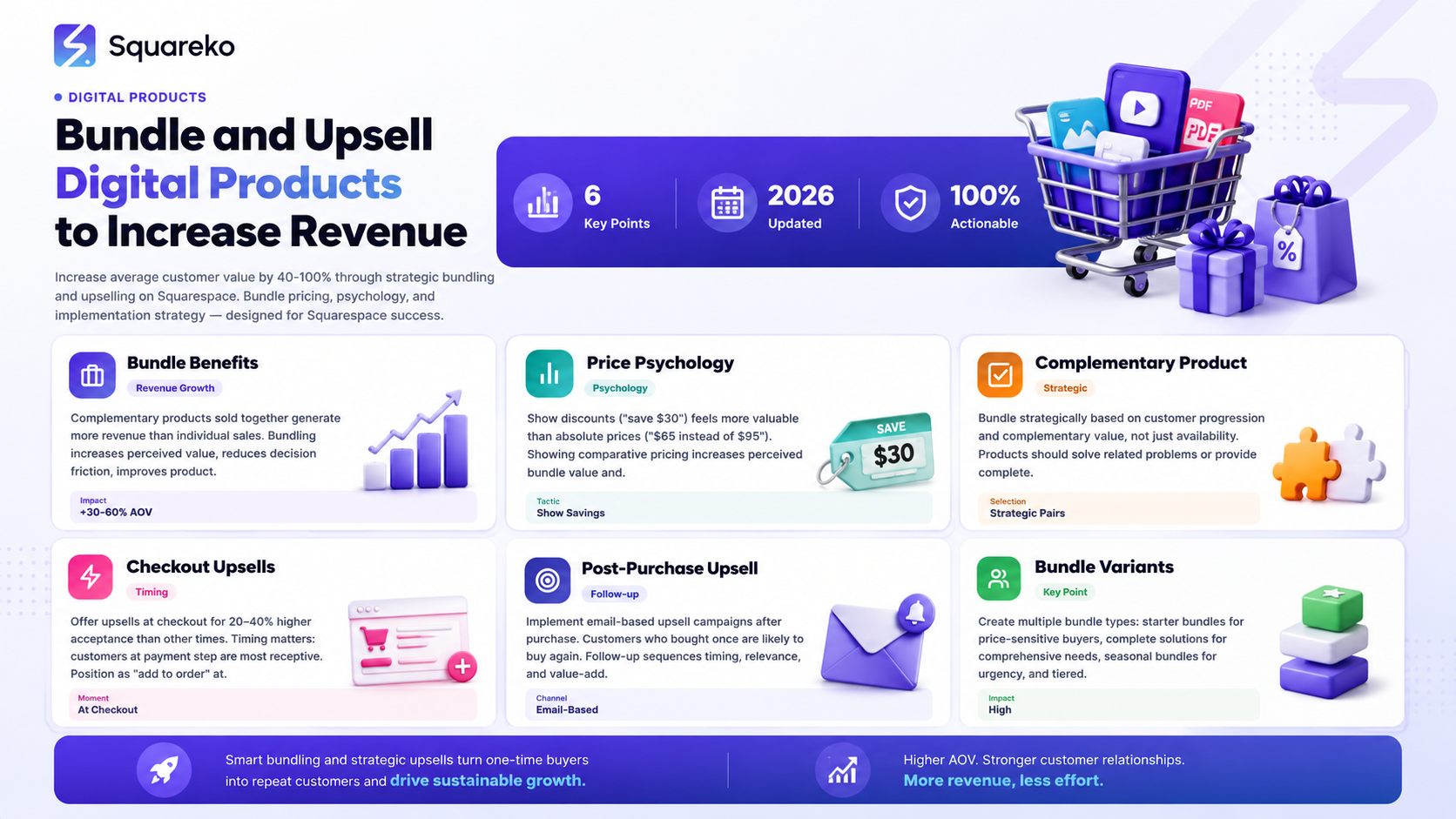
Bundling increases average customer value by 30-60% — complementary products sold together generate more revenue than the same products sold separately
Upsells at the right moment increase acceptance by 40-60% — timing matters: offer upsells at decision points (at checkout, after purchase) when customers are most receptive
Price psychology matters for bundles — showing discounts (save $30) feels more valuable than absolute bundled prices ($65 instead of $95)
Not all products should be bundled — bundle strategically based on customer progression and complementary value, not just availability
Lifetime customer value scales dramatically with bundling — customers who buy once are likely to buy again; bundling accelerates this progression
The Revenue Impact of Bundling
Bundling is one of the highest-leverage strategies for increasing revenue without increasing traffic.
The Math of Bundling
Scenario without bundling:
100 customers per month
60% buy Product A ($49)
20% buy Product B ($34)
Average customer value: 0.6 × $49 + 0.2 × $34 = $37.40
Monthly revenue: $3,740
Scenario with strategic bundling:
100 customers per month
40% buy Product A only ($49)
15% buy Product B only ($34)
30% buy Bundle of A+B ($65, instead of $83 if bought separately)
15% buy neither
Average customer value: (0.4 × $49) + (0.15 × $34) + (0.3 × $65) = $42.60
Monthly revenue: $4,260
Revenue increase: $520/month or 14% more revenue with same customers.
This assumes you convince just 30% of customers to buy the bundle instead of individual products.
Why Bundling Works
Increases perceived value — Bundle shows comparative pricing (save $18)
Reduces decision friction — Customers don't have to decide which product alone; bundle makes it obvious
Improves product fit — Complementary products together solve more complete problems
Increases customer lifetime value — Customers with multiple products become more committed and more likely to buy again
Bundle Types and Revenue Impact
Type 1: Starter bundle (low-priced bundle for budget-conscious buyers)
Increases market size by reaching price-sensitive customers
20-30% revenue increase typical
Type 2: Complete solution bundle (multiple products sold together at significant discount)
Increases average customer value through multi-product sales
30-50% revenue increase typical
Type 3: Seasonal/themed bundle (limited-time bundle around specific use case)
Creates scarcity and urgency
40-60% revenue increase during bundle period
Type 4: Tiered bundling (beginner, intermediate, advanced bundles)
Creates upgrade path and customer progression
50-80% revenue increase through upsells and progression
Bundling Strategy and Product Selection
Not all product combinations make sense. Strategic bundling requires careful product selection.
Identifying Complementary Products
Products should bundle together if:
They solve related problems
They serve the same customer
One improves the value of the other
Together they create a more complete solution
Examples of Complementary Products
Example 1: Template Creator
Product A: Email templates ($29)
Product B: Email copywriting guide ($24)
Bundle: Email templates + copywriting guide ($39, saves customer $14)
Why it works: Templates alone are useful, but copywriting guidance makes them far more valuable.
Example 2: Course Creator
Product A: Email marketing course ($49)
Product B: Email copywriting swipe file ($17)
Product C: Email templates ($19)
Bundle: Complete email toolkit ($67, saves customer $18)
Why it works: Course teaches strategy; swipes and templates provide implementation tools.
Example 3: Design Asset Creator
Product A: Icon set ($25)
Product B: Font collection ($35)
Bundle: Design essentials ($49, saves customer $11)
Why it works: Designers use both icons and fonts; bundling saves time and improves design consistency.
Products to Avoid Bundling
Avoid bundling:
Products that compete (don't bundle two email tools)
Products at very different price points (don't bundle $9 and $99 products—feels weird)
Products for different audiences (don't bundle design assets with business courses)
Products that cannibalize each other (don't bundle basic course with advanced course—pick one)
Creating Customer Progression Paths
Strategically design bundles to create progression:
Path 1: Beginner to Advanced
Beginner bundle: Basic course + simple templates ($39)
Intermediate bundle: Intermediate course + advanced templates ($69)
Advanced bundle: Advanced course + premium tools ($99)
Customers progress: buy beginner, later upgrade to intermediate, eventually to advanced.
Path 2: Lite to Premium
Lite bundle: Essential templates ($25)
Standard bundle: Templates + copywriting guide ($39)
Premium bundle: Templates + guide + swipes + bonus ($69)
Each bundle serves different budget level while creating upgrade path.
Path 3: Single to Comprehensive
Single product: Email templates ($29)
Complementary bundle: Templates + design assets ($49)
Complete solution: Templates + assets + copywriting + video course ($129)
Each bundle serves different stage of customer journey.
These progression paths increase customer lifetime value significantly because customers upgrade as they mature and gain budget.
Bundle Pricing Psychology
How you present bundle pricing determines whether customers perceive it as good value.
Comparative Pricing Presentation
Option 1: Absolute pricing Email marketing bundle: $69
Option 2: Savings presentation Email marketing bundle: $69 (save $14 when bought together)
Option 3: Component listing
Email course: $49
Swipe file: $17
Templates: $19
Subtotal: $85
Bundle price: $69 (you save $16)
The third option shows value most powerfully. Customers see individual price for each component, then see savings.
Price Anchoring
Anchor higher prices to make bundles feel more valuable:
Weak anchoring: Bundle: $69
Strong anchoring: Bundle normally $85, now just $69 (save $16)
The anchor ($85) makes the discounted price ($69) feel more valuable.
Bundle Price Points
Use price psychology principles:
Avoid: $70, $80, $90
Better: $65, $79, $97, $127
Prices ending in 7 or 9 feel more discounted than round numbers.
Discount Percentage Strategy
A specific savings amount ($16) feels more concrete than percentage discount (19% off).
Always show both to maximize perceived value:
Bundle normally $85, now $69 (save $16, that's 19% off)
Bundle Pricing by Tier
If offering multiple bundles:
Beginner bundle: $29-49 (attracts price-conscious buyers) Standard bundle: $49-99 (sweet spot for most) Premium bundle: $99-199+ (upsell to committed customers)
Avoid too many tiers. 3-4 tiers is optimal. More confuses decision-making.
Creating Bundle Variants
Squarespace allows creating product variants, which is perfect for bundles.
Variant Strategy
Rather than creating separate products for each bundle, create variants of a single product.
Example: Email Product
Main product: Email templates base price ($29)
Variants:
Email templates only: $29
Email templates + copywriting guide: $39
Email templates + guide + swipes: $59
Email templates + guide + swipes + video: $79
Customers choose variant that matches their needs.
Benefits of Variant Approach
Simpler product management — One product, multiple variants
Higher average order value — Customers naturally upgrade to higher-tier variants
Clearer choice architecture — Three options is optimal for decision-making
Better metrics — Track which variants are most popular
Implementing Bundles on Squarespace
Squarespace Commerce makes bundling implementation straightforward.
Setting Up Product Variants
Create primary product (the base offering)
Name: [Product] - Choose Your Bundle
Price: Base price of cheapest option
Add variants
In product settings, add Options
Create option: Bundle Type
Add variant 1: Starter - price difference (, $0 additional)
Add variant 2: Standard - price difference ( $10 additional)
Add variant 3: Premium - price difference ( $30 additional)
Set availability
If certain variants have limited inventory, mark accordingly
Digital products: All variants should be In Stock
Optimize product page
Clearly present each variant option
Show pricing for each
Explain what's included in each
Highlight savings vs. buying separately
Creating Standalone Bundle Products
Alternatively, create separate bundle products:
Example:
Product 1: Email Templates ($29)
Product 2: Email Copywriting Guide ($24)
Product 3: Email Bundle (includes both) ($39)
This approach:
Creates separate product pages
Allows unique descriptions for bundle
May confuse customers with overlapping products
Variant approach is usually cleaner.
Bundle Presentation on Product Page
Create clear comparison showing:
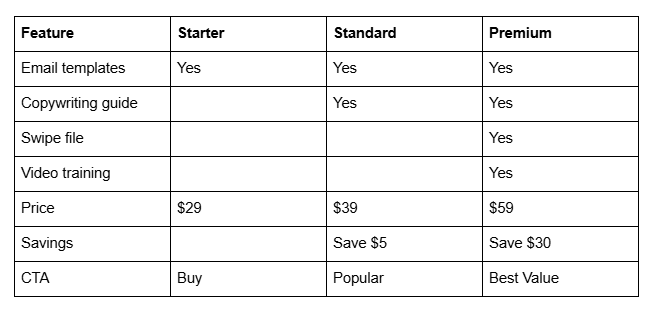
This table makes comparison clear and helps customers choose appropriate tier.
Checkout Upsells and Order Bumps
The moment before payment is your highest-conversion moment for upsells.
Order Bump Positioning
Display order bump just before payment information:
Add [Product] to your order for just $19 (usually $34) — [Benefit statement]
Position as checkbox (unchecked by default).
Order Bump Product Selection
Choose product that:
Complements main purchase
Solves adjacent problem
Is significantly discounted
Targets same customer
Example:
Customer buying: Email templates
Order bump: Email copywriting guide for $19 (save $5)
The copywriting guide makes the templates far more valuable.
Order Bump Pricing
Typical strategy: 40-50% discount on order bump
Full price: $34
Order bump price: $19
Savings: 44%
This creates genuine value while increasing revenue.
Conversion Rate Expectations
Expect 8-15% of customers to accept order bumps.
If 100 customers reach checkout and 12 accept $19 order bump:
Additional revenue: $228
Zero additional customer acquisition cost
Pure profit
Post-Purchase Upsells
The moment after purchase is your second-best upsell opportunity.
Confirmation Page Upsell
On the post-purchase confirmation page, display:
Your order is confirmed! You might also want to check out [Related Product]
Include:
Product image
Brief description
Special offer (15% off for new customers)
Purchase link
Follow-Up Email Upsell
Day 1-2 after purchase, send email with:
Subject: Congratulations on your purchase! Here's what's next
Content:
Confirmation of order
Download link or access information
Quick-start guide
Bonus tip
Upsell to complementary product with discount
Example: You just purchased our email templates. You might also want our email copywriting guide to maximize your results. Use code UPGRADE15 for 15% off.
Upsell Psychology
Most customers buy one product, then discover they need others later.
Immediate upsells (same day) catch customers while:
Wallet is already open
They're thinking about the problem
They're engaged with your brand
They're most likely to purchase
Customers who don't upsell immediately are 10x less likely to upsell later.
Email-Based Upsell Campaigns
Beyond immediate upsells, strategic email sequences drive larger upsells over time.
Email Sequence Strategy
Email 1 (immediate): Order confirmation + immediate upsell
Email 2 (day 2): How-to email on using product + complementary product suggestion
Email 3 (day 7): Implementation tips + upgrade suggestion
Email 4 (day 14): Customer success email + next-level product upsell
Email 5 (day 30): Feedback request + seasonal or new product announcement
Email Timing for Upsells
Best timing for upsells:
Day 0-1 after purchase: 40% conversion typical (customer wallet open)
Day 2-7 after purchase: 10-15% conversion typical (customer implementing)
Day 14-30 after purchase: 5-10% conversion typical (customer evaluating)
Day 30+ after purchase: 2-5% conversion typical (cold for upsell)
This is why immediate follow-up matters. Each day of delay reduces upsell likelihood.
Segmentation by Product Purchased
Different products require different upsells.
Customer bought: Email templates Relevant upsells: Copywriting guide, email training, design assets
Customer bought: Design course Relevant upsells: Template bundles, design tools, premium community
Customer bought: Software tool Relevant upsells: Training course, extended license, support packages
Segment your email upsells by what customers already bought.
Measuring Bundle Performance
Track bundling performance to understand what's working.
Key Metrics
Metric 1: Bundle adoption rate % of customers choosing bundled product vs. standalone
Target: 30-40% of customers choosing bundle
Metric 2: Average order value Compare before/after bundling implementation
Target: 20-40% increase from bundling
Metric 3: Order bump acceptance % of customers accepting order bump at checkout
Target: 8-15%
Metric 4: Revenue per customer Track overall increase in revenue per customer
Typical result: 30-50% increase after implementing bundling strategy
Metric 5: Customer lifetime value Customers who buy bundles vs. standalone products
Target: Bundled customers should have 2-3x higher lifetime value
Tracking in Squarespace
Use Google Analytics to track:
Revenue by product (including variants)
Average order value
Conversion rate by product
Use email platform to track:
Open rate of upsell emails
Click rate to upsell products
Conversion rate (customers who click and purchase)
Scaling Bundle Strategy
As your business scales, bundling becomes increasingly important.
Year 1 Bundling
1-2 complementary product bundles
Basic order bumps
Simple follow-up upsells
Goals: Test bundling, measure impact, learn what works
Year 2 Bundling
3-5 strategic bundles
Tiered bundling (starter, standard, premium)
Comprehensive email upsell sequences
Seasonal bundles
Goals: Systematize bundling, increase average customer value 50%+
Year 3+ Bundling
Extensive product suite with strategic bundling
Advanced tiering with clear customer progression paths
Sophisticated upsell automation
Joint bundles with complementary creators
Goals: Create multiple revenue streams, build customer lifetime value significantly
Joint Bundling with Other Creators
As you scale, partner with complementary creators:
Your email templates + their email copywriting service
Benefits:
Expands bundle appeal
Shares marketing costs
Provides genuine complementary value
This works if products genuinely complement each other without competing.
Conclusion
Bundling and upselling are among the highest-leverage revenue strategies for digital product businesses. They increase revenue without requiring new traffic or new customers.
The math is compelling:
Small percentage increase in average customer value (30-50%)
Same customer acquisition cost
Dramatic revenue increase
Most successful digital product businesses use bundling and upselling systematically. It's not optional—it's essential to scaling beyond the first few thousand dollars per month.
Start with one strategic bundle. Measure results. Then expand bundles systematically.
CTA Section
Ready to increase your digital product revenue by 30-50%?
Bundling and upselling are powerful but require strategy. Many creators try bundling unsuccessfully because they bundle wrong products or price them incorrectly.
At Squareko, we specialize in bundling strategy and upsell implementation for digital product businesses. We've helped creators increase average customer value from $39 to $79+ through strategic bundling.
We offer:
Bundle strategy development
Product pairing recommendations
Pricing optimization for bundles
Upsell sequence setup and automation
Performance measurement and optimization
Get a free bundling audit. We'll analyze your current products and recommend strategic bundles that could increase your revenue.
Frequently Asked Questions
-
Typically no. While bundled pricing is discounted, higher adoption rate and increased accessibility to price-sensitive customers usually increases total revenue. Test carefully and measure.
-
3-4 variants is optimal. More confuses decision-making. Less doesn't provide choice. The rule: fewer than 3 feels limiting; more than 4 feels overwhelming.
-
Yes. Two products bundled together is a valid bundle. Build your product suite over time, then expand bundles as you add products.
-
Possibly. If the worst-selling product genuinely complements the best-seller, bundling can help. If they're unrelated, bundling might just discount your best-seller. Test and measure.
-
Track bundle adoption. If less than 20% of customers choose bundle, price might be too high. If more than 60% choose bundle, you might be underpriced. Target 30-45% bundle adoption.
-
Yes, but use sparingly. Too many limited bundles confuse customers. 1-2 limited bundles per year is healthy. Don't make urgency your primary strategy.
-
Yes. Bundles have higher revenue impact, so promote them prominently. Feature in email marketing, social media, and on your homepage. Individual products are good for niche customers; bundles are good for most.
-
Typically 15-25% off bundled price vs. individual purchase. Too high (50%+) trains customers to wait for bundles. Too low (5%) doesn't feel like value. Test in 5% increments to find your sweet spot.

From custom website design to SEO strategy, we help businesses launch a site that looks professional and performs better.

Author Bio
I'm Walid Hasan, a Certified Squarespace Expert and Squarespace Circle Platinum Partner with over 12 years of hands-on experience designing and optimizing high-performing websites. Over the years, I've had the privilege of building more than 2,000 Squarespace websites for clients around the world, always focusing on clean design, strong user experience, and conversion-driven results.
