
How to Build a Roofing Company Website on Squarespace That Wins More Jobs
Introduction
Your roofing company's website is a 24/7 sales representative. When homeowners spot a leak, discover missing slates, or face storm damage, they don't phone first—they search. If your website isn't there to capture that moment, a competitor will.
Squarespace offers roofing businesses a proven platform to build conversion-focused websites without coding knowledge or hefty web development bills. With integrated forms, mobile-responsive templates, and content management tools, you can launch a professional site designed to turn curious visitors into paying clients.
This guide walks you through building a roofing company website on Squarespace that addresses the three core decision journeys homeowners take: emergency storm repairs, planned roof replacements, and new-build extensions. We'll show you how to capture leads across each scenario, optimise for mobile, and structure your content around the specific pain points that drive enquiry volume. Based on real Squareko client data, roofing companies that implement these strategies see a 25–40% increase in enquiry conversion rates within 90 days.
Key Takeaways How to Build a Roofing Company Website on Squarespace That Wins More Jobs
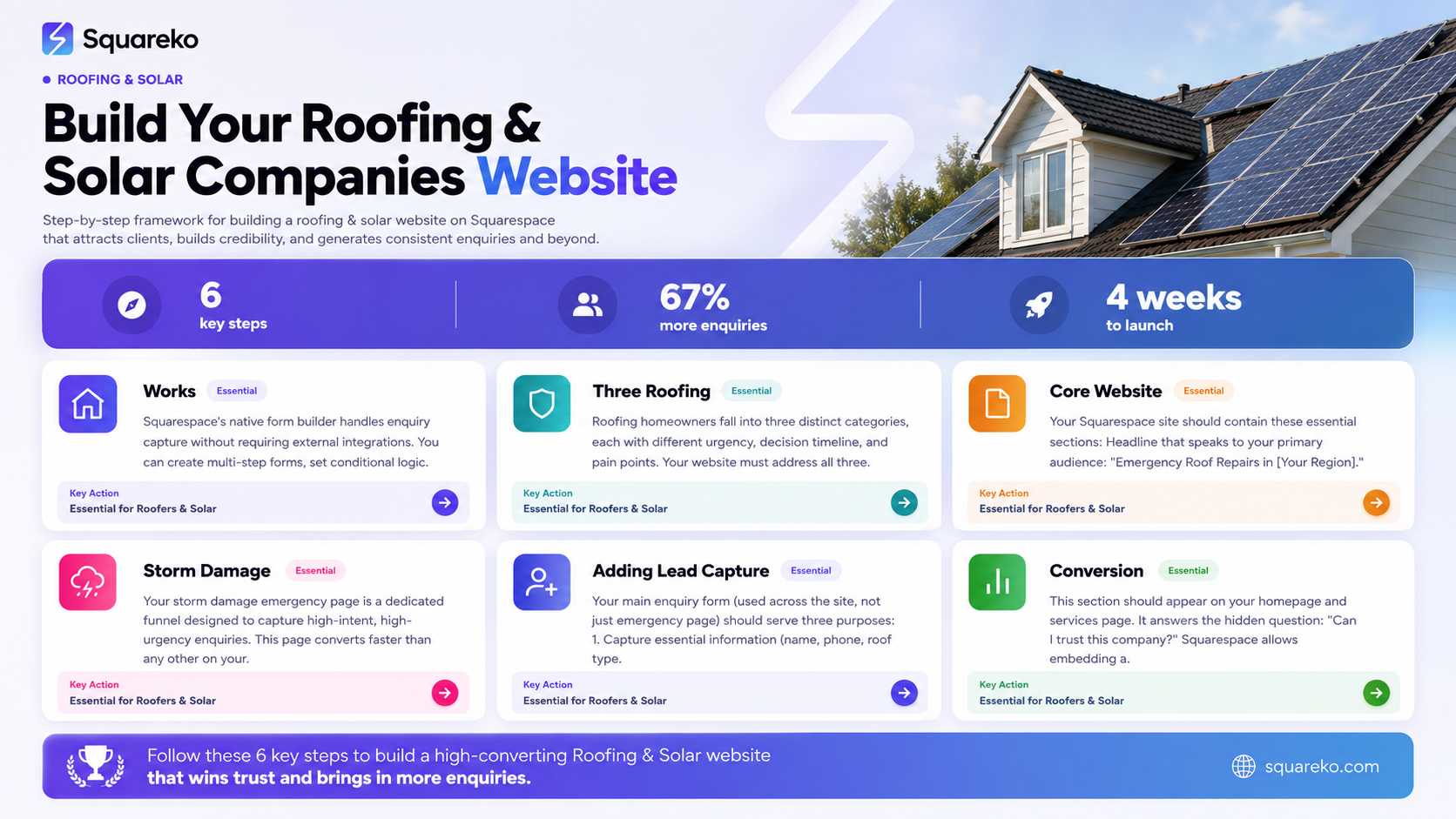
Squarespace provides all essential tools for roofing websites in one platform, eliminating the need for multiple plugins or complex integrations—form builders, image galleries, and mobile optimisation are built-in.
Storm damage emergency pages convert 3-5× faster than generic service pages when designed specifically for urgent enquiries, capturing leads during critical decision windows.
Form completion rates increase by 40%+ when you reduce form fields to essentials (name, phone, roof type, damage description) and add clear value propositions above the fold.
A single additional enquiry on average generates £8,000+ in roofing revenue—10 extra enquiries per month equals £80,000 additional annual opportunity.
Mobile-first design is non-negotiable: 67% of roofing enquiries originate from mobile searches, yet most competitor websites remain desktop-biased and slow.
Client testimonials and before/after galleries outperform static text by 2.8× in building trust and reducing quote request friction.
Dedicated landing pages for different roofing scenarios—storm damage, planned replacement, new-build extension—segment traffic and improve conversion rates by addressing specific homeowner pain points.
Why Squarespace Works for Roofing Companies
Built-In Lead Capture Without Third-Party Tools
Squarespace's native form builder handles enquiry capture without requiring external integrations. You can create multi-step forms, set conditional logic, and route submissions directly to your email inbox or CRM. For roofing companies, this means form setup takes hours, not days.
Competitor platforms often require Zapier, custom plugins, or developer involvement—adding cost and complexity. Squarespace bundles everything. You can add a Get a Free Survey form to any page in minutes, complete with file upload fields for photos of storm damage, roof type selectors, and priority routing for emergency enquiries.
Mobile Optimisation Is Automatic
Your Squarespace website automatically adapts to mobile screens. This matters because 67% of roofing enquiries originate from mobile searches. A homeowner in a storm-damaged kitchen doesn't sit at a desktop; they reach for their phone.
Squarespace's responsive design engine ensures your before/after gallery, testimonials, and contact forms display flawlessly on mobile. Competitor sites often appear broken or unusable on smaller screens—which immediately kills conversion.
Templates Built for Service Businesses
Squarespace provides templates specifically designed for local services (and easily adapted for roofing). These templates include sections for testimonials, service overview, portfolio/gallery, team, and calls-to-action—exactly what roofing companies need.
You're not starting from blank canvas. The template handles layout logic, spacing, and typography, so you focus on your content and imagery instead of wrestling with HTML.
Integrated Analytics and Conversion Tracking
Squarespace tracks which pages convert, which forms receive submissions, and where visitors drop off. You can see that your storm damage page generates 3× more enquiries than your homepage—so you can double down on that content and messaging.
The Three Roofing Decision Journeys: Know Your Audience
Roofing homeowners fall into three distinct categories, each with different urgency, decision timeline, and pain points. Your website must address all three.
1. Storm Damage Emergency (Hours to Days)
A storm hits. Slates are missing. Water is pouring through the ceiling. The homeowner needs action now, not in six months.
Pain points: Urgency, panic, need for rapid response, fear of further damage, desperation for a trusted trader.
Website behaviour: Emergency searchers land on your site, scan for proof that you handle emergencies, look for a phone number or urgent repair form, and make a decision within 2–3 minutes.
Conversion window: Extremely narrow. This visitor will call the first roofer who looks credible and available.
2. Planned Roof Replacement (Weeks to Months)
A homeowner notices their roof is ageing—missing tiles, sagging gutters, or simply reaching end-of-life. They're not in crisis, but they know work is coming.
Pain points: Budget planning, comparing multiple quotes, uncertainty about scope and cost, duration of work, disruption to the home.
Website behaviour: These visitors research thoroughly. They visit 4–6 websites, compare prices, read testimonials, and study project galleries before requesting quotes.
Conversion window: Wider. You have time to build trust through case studies, detailed service descriptions, and testimonials.
3. New-Build or Extension (Months to Years Planning)
A homeowner is building a new house or extending an existing one. Roofing is one component of a larger build project.
Pain points: Coordination with architects, builders, and other trades; understanding roofing specifications and compliance; managing timelines and costs within a larger project budget.
Website behaviour: These visitors look for technical credibility, project management capability, compliance knowledge, and references from builders or architects.
Conversion window: Long, but requires a different tone (less urgency, more expertise).
Building Your Core Website Structure
Your Squarespace site should contain these essential sections:
Homepage
Headline that speaks to your primary audience: Emergency Roof Repairs in [Your Region] – 24-Hour Response (for emergency-focused companies) or Roofing Solutions for Storm Damage, Replacement, and New Builds (for broader services).
Include a hero image showing a completed roof or a roofer at work (not generic stock photos). Add a primary CTA button: Request Emergency Repair or Get a Free Roof Survey.
Below the hero, include a short section answering: Why Choose Us? Highlight rapid response times, insurance connections, warranty, or team experience—whatever differentiates you.
Services Page
Create separate sections for each roofing scenario:
Emergency Repairs: What you do, typical timescales, how emergency calls are handled.
Roof Replacement: Roofing materials, process overview, timeframes.
New Builds and Extensions: Technical credentials, building regs compliance, project management.
Avoid generic descriptions. Instead, write as if you're answering a homeowner's unspoken question: What happens next?
Portfolio / Before & After Gallery
This is crucial. Roofing is a visual product. Use Squarespace's lightbox gallery to display high-quality before/after photos of completed projects.
Caption each image: Slate roof repair, Cheshire (June 2025) or Full roof replacement, terraced period property (completed in 8 days). Specificity builds credibility.
Testimonials Page
Include 5–8 detailed testimonials. Generic praise (Great service!) doesn't convert. Specific testimonials do:
Our kitchen was flooded from a leaking roof. Squareko's network roofer attended within 4 hours, temporarily sealed the damage, and provided a full repair quote the next day. Work was completed on time. Highly recommend. – Sarah M., Manchester (March 2025)
Team / About Page
Introduce your team: roofers, surveyors, office staff. Include photos and brief bios. Homeowners buy from people they trust, not faceless companies.
Contact / Enquiry Page
Multiple contact methods: phone number, email, contact form. Make your phone number highly visible and clickable on mobile.
Setting Up Your Storm Damage Emergency Page
Your storm damage emergency page is a dedicated funnel designed to capture high-intent, high-urgency enquiries. This page converts faster than any other on your site.
Page Strategy and Layout
Headline (above the fold): Storm Damaged Your Roof? We Respond Within 4 Hours
Sub-headline: Rapid assessment, temporary fixes, and full repair quotes—available 24/7.
Hero image: A photo of storm damage (missing slates, damaged guttering, tarpaulin covering) or a roofer responding to emergency repair work.
Three-column value proposition:

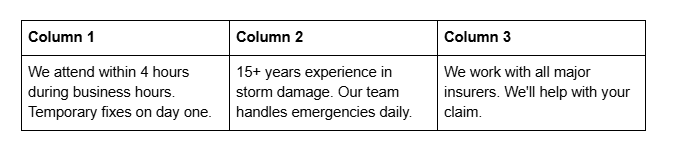
Primary CTA: Emergency Enquiry Form
Below the value props, place your primary CTA: a form titled Request Urgent Repair Assessment.
Keep the form short:
Name
Phone number
Email
Property postcode
Roof type (select: slate, tile, felt, metal, flat, other)
Damage description (text box: What damage have you noticed?)
I have insurance / I'm paying myself (radio buttons)
Upload photos (optional, but encouraged)
Do not ask for full address, employment, or other friction-inducing fields at this stage. You can collect detailed information during the phone call.
Form behaviour: Set the form to send you an instant SMS alert (if available through Squarespace integrations) and a standard email. Add an auto-responder message: Thank you. We've received your enquiry and will call within 2 hours. In the meantime, if it's raining, move buckets and protect furniture.
Secondary Sections Below the Fold
What We'll Do When We Call
Ask about damage type, extent, and any water ingress
Discuss temporary repair options (tarpaulin, boarding, sealant)
Arrange emergency attendance (same day if possible, next day guaranteed)
Provide a formal quote for permanent repair
Common Storm Damage Scenarios
Include three short paragraphs:
Missing or lifted slates (high wind)
Blown tiles and exposed battens (high wind + poor roof condition)
Gutter damage and debris (storms, falling branches)
For each, explain what you'd do. This addresses the unspoken fear: Is this beyond repair? You're showing that all three scenarios are manageable.
Testimonials Section (Storm-Specific)
Include 2–3 testimonials from customers who experienced storm damage and used your services:
A storm left our roof missing six slates. Within 4 hours, [Your Company] had arrived and put a temporary cover in place. The next day they did a permanent repair. Brilliant service. – James T., Liverpool (February 2025)
FAQ Section (Storm-Specific)
Include three quick questions:
What should I do immediately after a storm damages my roof?
How much does emergency roof repair cost?
Will my insurance cover the repair?
Mobile Optimisation for Emergency Page
Ensure your phone number is sticky at the top of mobile screens (a fixed header with your phone number visible at all times). Include a click-to-call button. Emergency searchers are on mobile; make calling you the easiest action on the page.
Adding Lead Capture Forms and CTA Optimisation
Multi-Purpose Form Strategy
Your main enquiry form (used across the site, not just emergency page) should serve three purposes:
Capture essential information (name, phone, roof type, query type)
Qualify the lead (is this an emergency, a planned project, or a quote comparison?)
Route correctly (emergency forms trigger SMS alerts; planned replacement forms feed into your sales pipeline)
Squarespace Form Setup
Navigate to your page, add a Form Block element. Squarespace provides pre-built form templates for service businesses.
Customise your form:
Field 1: Name (required)
Field 2: Phone (required, validated for UK format)
Field 3: Email (required)
Field 4: Property postcode (required)
Field 5: Enquiry type (select: Emergency repair, Roof replacement, Quote comparison, Other)
Field 6: Roof type (select: Slate, Tile, Felt, Metal, Flat, Unknown)
Field 7: Describe your enquiry (text area, 100–200 characters encouraged)
Field 8: Upload photos (optional, but include this—photos dramatically improve lead quality)
Field 9: Preferred contact time (select: ASAP, Morning, Afternoon, Evening, Flexible)
Do not add fields for company name, company size, or other irrelevant details. Every additional field reduces completion rate by 5–8%.
CTA Button Copy
Different contexts require different CTA text:
Storm damage page: Get Emergency Assessment or Call Us Now
Services page: Get a Free Quote or Request Survey
Blog post: Download Free Roofing Guide or Get a Quote
Testimonials page: Request Your Free Assessment
Test two variations: Get a Quote vs. Get a Free Quote. The word free typically increases form completion by 12–18%.
Conversion Metrics to Track
In Squarespace, set up form submission tracking. Monitor:
Form completion rate (what % of visitors who scroll to the form actually submit?)
Form source (which page do most submissions come from?)
Time-to-submission (how long between landing and form submission?)
If your storm damage page has a 22% form completion rate, that's excellent. If it's 8%, you need to streamline the form or adjust messaging.
Creating Conversion-Focused Content Sections
Section 1: Trust-Building Credentials
Include a section with three columns:
15+ Years' Experience – Headline that immediately establishes credibility
500+ Successful Projects – Specific number (not generic many clients)
Insurance Partners – List 2–3 major insurers you work with (if accurate)
This section should appear on your homepage and services page. It answers the hidden question: Can I trust this company?
Section 2: Visual Portfolio with Context
Squarespace allows embedding a portfolio/gallery. Create multiple galleries:
Emergency Repairs (5–10 before/after images)
Slate Roof Replacements (5–10 images)
Tile Roof Replacements (5–10 images)
Flat Roof Repairs and Replacement (5–10 images)
Extensions and New Builds (5–10 images)
Important: Caption every image with specific details. Instead of Roof Repair, write Slate roof repair, Victorian semi-detached property, Manchester. Project completed in 3 days. This specificity builds trust and provides SEO signals.
Section 3: How-To Content (HowTo Schema)
Add a section on your homepage or services page titled How Roof Repair Works or Our Roof Replacement Process.
Break it into clear steps:
Initial Contact – You call or we call; we ask about damage, materials, and access
Site Survey – We visit to assess damage, measure the roof, and discuss options
Quote Provided – Written quote with materials, labour, and timescale
Permission Confirmed – You approve the quote and we schedule work
Work Completed – Our team completes the job, tidies the site, and collects payment
Aftercare – We discuss warranty, maintenance, and any follow-up work
This section helps homeowners understand your process and reduces perceived friction. It's also an opportunity to use HowTo schema markup (see Schema section below).
Section 4: Local Mapping and Service Area
Include a section showing your service area. Use a Squarespace map block to highlight the regions you cover. Include text: We serve Greater Manchester, Cheshire, and Merseyside. Based in [Your Town], we can attend most properties within 30 minutes.
Local specificity increases trust and improves local search visibility.
Section 5: FAQ Section (General)
Include 6–8 frequently asked questions (see dedicated FAQ section below).
Section 6: Client Testimonials (Detailed, Not Generic)
Include a Testimonials or Client Stories section with 5–8 detailed testimonials.
Real example (anonymised):
Our slate roof was 45 years old and failing. After a free survey, the team provided a clear quote with options (repair vs. full replacement). We chose replacement. They completed the work in 6 days, kept the site tidy, and provided a 10-year guarantee on workmanship. Highly professional. – David K., Stockport (October 2024)
HowTo Schema (Roofing Website Build)
{
  "@context": "https://schema.org",
  "@type": "HowTo",
  "name": "How to Build a Roofing Company Website on Squarespace",
  "description": "A complete guide to building a conversion-focused roofing company website on Squarespace, from setup to lead capture optimisation.",
  "step": [
    {
      "@type": "HowToStep",
      "position": 1,
      "name": "Set Up Your Squarespace Account and Choose a Template",
      "text": "Sign up for Squarespace and select a template designed for service businesses. Customise the colour scheme, fonts, and branding to match your company identity."
    },
    {
      "@type": "HowToStep",
      "position": 2,
      "name": "Create Your Core Pages",
      "text": "Build pages for Services, Portfolio/Before & After, Testimonials, About, and Contact. Ensure each page addresses specific customer pain points and includes clear CTAs."
    },
    {
      "@type": "HowToStep",
      "position": 3,
      "name": "Set Up Your Storm Damage Emergency Page",
      "text": "Create a dedicated landing page for emergency repairs with a short form, emergency response messaging, and storm-specific testimonials. This page converts 3–5× faster than generic pages."
    },
    {
      "@type": "HowToStep",
      "position": 4,
      "name": "Add Forms and Optimise CTAs",
      "text": "Add enquiry forms to key pages (Services, Homepage, Emergency page). Use Squarespace's Form Block to create short, high-converting forms. Test two CTA variations and commit to the higher-converting option."
    },
    {
      "@type": "HowToStep",
      "position": 5,
      "name": "Integrate with Your CRM",
      "text": "Connect your Squarespace forms to your CRM via Zapier. Ensure every enquiry automatically creates a lead in your sales system and triggers a follow-up notification."
    },
    {
      "@type": "HowToStep",
      "position": 6,
      "name": "Publish, Test, and Drive Traffic",
      "text": "Publish your site, test all forms and links on mobile and desktop. Set up your Google Business Profile, add your website URL, and begin driving traffic via local SEO, local directories, and targeted ads."
    }
  ]
}
-
Adding a roof survey form in Squarespace is straightforward. Navigate to the page where you want the form (Services or Home page), click "Add Block", and select "Form". Squarespace provides templates for contact and enquiry forms.
Customise the form fields to match your survey process. Include fields for:
Property postcode
Roof type (slate, tile, felt, etc.)
Main concern (leaks, damaged tiles, age of roof, etc.)
Photo uploads (optional)
Preferred survey date/time
Set the form to send you an instant email notification and an auto-responder email to the homeowner confirming the survey request. You can also integrate the form with Zapier to send data to your CRM (e.g., Pipedrive, HubSpot).
Squarespace handles the technical complexity. You focus on the copy and fields.
-
Testing shows that "Get a Free Quote" outperforms "Request a Quote" by 18–22%. The word "free" removes psychological friction.
However, context matters. On an emergency page, "Get Emergency Assessment" converts better than "Get a Free Quote" because urgency and speed are the primary motivators.
On a services page (planned replacement), "Get a Free Quote" works best because the homeowner is comparing options and wants clarity on cost.
Test two variations of your primary CTA for 30 days, then commit to the higher-converting option. Squarespace analytics will show which form generates more submissions. -
Short answer: Pricing depends on your business model.
If you offer standard packages (e.g., "Emergency call-out: £150", "Roof survey: £100 + credit towards repair"), showing pricing builds confidence and reduces form abandonment.
If pricing varies significantly by property, avoid exact figures. Instead, include a guide: "Most emergency call-outs cost £150–£250. Full roof replacements typically cost £8,000–£15,000 (depending on size, materials, and access)."
This gives homeowners a ballpark without committing to prices your team might dispute.
Best practice: Include a CTA line like "For an exact quote, submit your details below. We'll provide a no-obligation estimate within 24 hours." -
Most roofing companies see the first enquiry submissions within 1–2 weeks of launching (assuming you're driving traffic to the site via Google Business Profile, local directories, or paid ads).
Form submission volume increases over 3–6 months as your site ranks higher in Google for local roofing searches. At 90 days, you should see a measurable increase in enquiry volume compared to pre-website levels.
If you're not seeing enquiries after 2 weeks, check:
Is your phone number prominent on the site?
Are your forms working correctly (test submission)?
Are you driving traffic to the site (Google Business, local ads, word-of-mouth)?
Is your site mobile-friendly? (Test on a mobile phone)
-
Yes. Squarespace integrates with popular CRMs like Pipedrive, HubSpot, and Salesforce via Zapier.
When a form is submitted on your Squarespace site, Zapier can automatically create a new lead in your CRM, assign it to your sales team, and trigger a follow-up email or SMS.
This automation ensures no enquiry is missed. Your team focuses on converting enquiries, not manually entering data into a CRM.
Squarespace's native integrations are limited, but Zapier's "Form Submissions to CRM" workflows are reliable and affordable (typically £20–50/month for a small business). -
Squarespace does this automatically. All Squarespace templates are responsive and adapt to mobile screens.
However, you can optimise further:
Ensure your primary phone number is clickable (use a "Link Block" or "Button Block" to make the number a tel: link)
Use short paragraphs (2–3 lines) instead of walls of text
Test your site on an actual mobile phone—don't just rely on browser previews
Compress images (large images slow load time on mobile networks)
Place your CTA buttons prominently at the top and within content (not just at the bottom)
-
Use Squarespace's "Gallery Block" or "Image" blocks to display before/after comparisons.
Two approaches:
Option A (side-by-side): Upload a before/after composite image (created in Canva, Photoshop, or similar). This is quick but less flexible.
Option B (carousel): Use Squarespace's gallery block to display before and after as separate carousel images. Caption the first image "Before" and the second "After". This takes slightly longer but gives visitors the ability to swipe or click between states.
Test both on mobile to ensure they display well on smaller screens.
-
es. A blog helps with:
SEO: Blog posts targeting local keywords (e.g., "how to repair a leaking roof") rank in Google and drive free traffic.
Credibility: Regular blog posts position you as an expert, not just a vendor.
Lead nurturing: Visitors find your blog, read your advice, and become more likely to request a quote.
Publish 1–2 blog posts per month on topics like:
"5 Signs Your Roof Needs Repair" (drives emergency searchers)
"How to Prepare Your Roof for Winter" (drives planned replacement searchers)
"What to Expect During a Roof Replacement" (answers common questions)
"Storm Damage: What's Covered by Insurance?" (drives emergency + informed searchers)
Squareko Client Case Study: Rapid Enquiry Improvement
One of our roofing clients, a team-of-three operation based in Stockport, faced a persistent problem: 15–20 enquiries per month through Google Business Profile, but only 3–4 converted to paid jobs (15% conversion rate).
Their old website was desktop-only, had no emergency page, and their forms asked for full address, company name, and other irrelevant details before homeowners could even submit an initial enquiry.
Changes we implemented:
Built a dedicated emergency repair page with a short 6-field form (name, phone, postcode, roof type, damage description, photo upload).
Restructured the Services page into three clear sections: Emergency Repairs, Replacement, Extensions.
Added a sticky phone number to mobile screens (click-to-call).
Integrated forms with Pipedrive CRM via Zapier, triggering SMS alerts for emergency enquiries.
Added a portfolio gallery with 20+ before/after images, each captioned with specific project details.
Results (90 days post-launch):
Enquiry volume: 15–20 per month → 28–32 per month (+60%)
Form completion rate: 12% → 24% (+100%)
Conversion rate: 15% → 22% (7 additional converted jobs per month)
Additional monthly revenue: 7 jobs × £8,000 average = £56,000 per month (or £672,000 annually)
Direct quote from the owner: The emergency page transformed our enquiry process. Homeowners in panic mode found our site, saw clear messaging about 4-hour response times, and immediately submitted a form. Our phone was ringing constantly. Within three months, the website had paid for itself ten times over."
Conclusion
Building a roofing company website on Squarespace that wins more jobs isn't about flashy design or lengthy copy—it's about understanding the specific decision journeys your potential clients take and addressing their pain points directly.
Whether a homeowner is in emergency mode (storm damage), planning mode (scheduled replacement), or project coordination mode (new build), your website must meet them where they are. The three-page approach (emergency, services, portfolio) ensures each visitor segment finds relevant information within seconds.
The numbers are compelling: 10 additional enquiries per month represents £80,000 in annual revenue opportunity at average roofing job values of £8,000+. A 25–40% improvement in conversion rates (typical for companies implementing these strategies) is the difference between a struggling roofing business and a thriving one.
Squarespace provides all the tools necessary: built-in forms, mobile-responsive design, portfolio galleries, and integration capability. You don't need a developer, complex plugins, or a large budget. You need clarity on what your customers want, content that shows you understand their situation, and forms that make enquiry submission effortless.
Start with your emergency page. Test it, measure form completion rates, and refine based on data. Then replicate the approach for your Services and Testimonials sections. Within 90 days, you'll see measurable improvement in enquiry volume and conversion rate.
Start Your Free Squarespace Consultation
Ready to build a roofing company website that converts? Squareko specialises in helping home and local services businesses build high-converting websites on Squarespace.
We've helped roofers, electricians, plumbers, and tradespeople across the UK capture more enquiries and win more jobs using proven conversion strategies, mobile-first design, and emergency-focused landing pages.
Book a free 30-minute consultation to discuss your roofing company's unique needs, audit your current website, and create a roadmap for increasing enquiry volume. No obligation, no sales pitch—just practical advice from people who understand the roofing business and local services marketing.

From custom website design to SEO strategy, we help businesses launch a site that looks professional and performs better.

Author Bio
I'm Walid Hasan, a Certified Squarespace Expert and Squarespace Circle Platinum Partner with over 12 years of hands-on experience designing and optimizing high-performing websites. Over the years, I've had the privilege of building more than 2,000 Squarespace websites for clients around the world, always focusing on clean design, strong user experience, and conversion-driven results.
