
How to Build a Health and Wellness Website on Squarespace That Books More Clients
Key Takeaways Build a Health and Wellness Website on Squarespace That Books More Clients
Essential pages for health websites: Home, About, Services, Testimonials, FAQ, and Booking/Contact — no more, no less
Above-the-fold CTA is critical — booking button or contact form must appear in first 800 pixels; visible CTAs increase bookings by 25-35%
Social proof matters more than credentials — testimonials and results convert better than lengthy bios; 72% of health seekers trust testimonials as much as personal recommendations
Squarespace Scheduling integration is seamless — clients book directly on your site without leaving, reducing friction by 90% compared to email back-and-forth
Mobile optimization is non-negotiable — 68% of health and wellness traffic is mobile; slow load times lose 40% of visitors within 3 seconds
GDPR compliance for health data is essential — Squarespace handles data security, but you must communicate how client information is protected
Here's what most health professionals get wrong: they build a website to showcase their credentials and qualifications. They load it with information about their background, their approach, their philosophy. Then they wonder why they're not getting bookings.
The truth is harder and simpler at once. A website that attracts clients doesn't primarily sell your credentials—it sells a solution to a specific problem. It removes friction from the booking process. It builds immediate trust. And it positions you as the obvious choice within 10 seconds of arrival.
We'll walk through exactly how to build a health and wellness website on Squarespace that converts visitors into paying clients. You'll learn which pages you need, how to write copy that moves people to action, how to integrate booking and scheduling, and which design and trust signals matter most.
Choose Your Template and Foundation
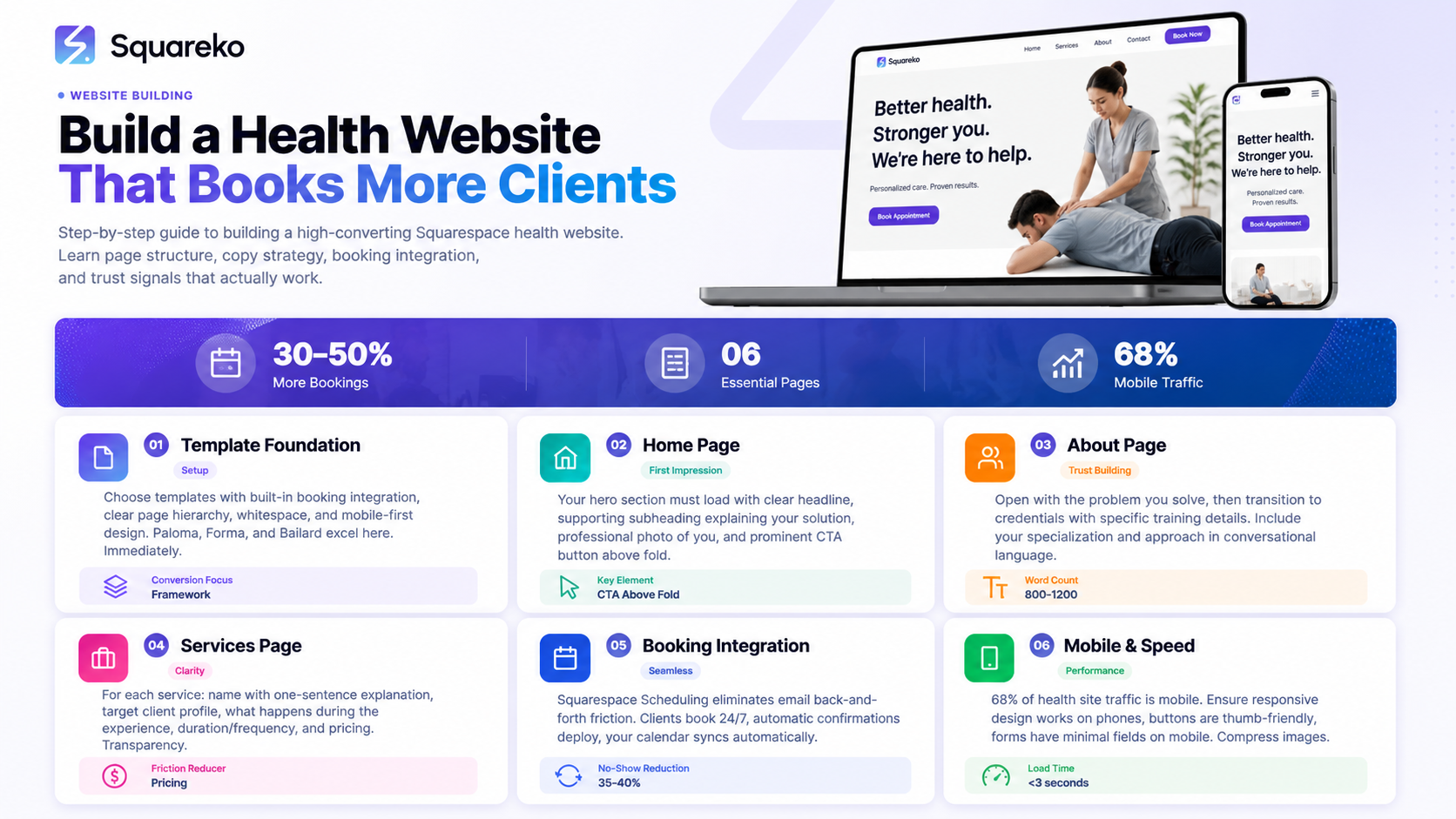
Your first decision is template selection. For health professionals, templates fall into two categories: those that support conversion and those that don't.
Look for templates with these specific features:
Built-in booking integration — The template supports Squarespace Scheduling without extra code
Clear page hierarchy — You can easily create distinct sections for Services, About, Testimonials
Whitespace and breathing room — Health websites shouldn't feel cluttered or aggressive
Mobile-first design — The template looks equally sharp on desktop and mobile
Professional testimonial sections — Built-in space for client reviews that doesn't feel tacked-on
Templates like Paloma, Forma, and Bailard excel here. (We've reviewed these in depth in our template selection guide.)
Choose your template, then immediately set up these core pages in this order: Home, Services, About, Testimonials, FAQ, Booking. Don't add anything else yet. You can expand later with blog sections, resource pages, or video galleries. Start lean.
Build Your Home Page for Conversion
Your homepage is a conversion machine, not a welcome mat. Every element should serve one purpose: move visitors toward booking.
Section 1: Hero and CTA (First 800 pixels)
Your hero section should include:
A clear, benefit-focused headline (not "Welcome to My Practice")
A supporting subheading that states the problem you solve
A professional photo of you (not a generic image)
One prominent CTA button: "Book Your Session" or "Schedule a Consultation"
Example: "Book Your Therapy Session with Sarah — Specializing in Anxiety and Life Transitions."
The booking button must appear in the first 800 pixels. Research from conversion rate optimization specialists shows health professionals see 25-35% higher booking rates when CTAs are immediately visible. Don't bury your booking option three scrolls down.
Section 2: Your Credentials and Trust Signals (Next 500 pixels)
Immediately below your CTA, display:
Your professional certifications (BACP, COSCA, BDA, ANutr, RNutr, REPs, CIMSPA, Yoga Alliance, ICF—list them all with logos if available)
Professional affiliations and memberships
Number of clients served (if significant: "Helped over 500 clients...")
Years of experience
Don't write paragraphs here. Use icons, badges, and simple statements. Credentials are visual proof, not storytelling opportunities.
Section 3: Three Key Benefits (Next 400 pixels)
List three specific benefits of working with you. Not features, benefits. Not "I use cognitive behavioral therapy," but "You'll learn practical anxiety management techniques you can use daily."
Use three columns with icons. Short, benefit-driven copy. One sentence per benefit.
Section 4: Testimonials (Next 400 pixels)
Show 2-4 client testimonials in rotation. These should include the client's name, a photo if possible, a specific result or outcome, and ideally their profession (for social proof).
Example: "I was skeptical about therapy, but Sarah helped me understand my patterns in two sessions. I haven't felt this clear-headed in years. Highly recommend." — James P., Software Engineer
Research shows 72% of people seeking health services trust testimonials as much as personal recommendations. This section is crucial for conversion.
Section 5: FAQ Preview (Next 300 pixels)
Show 3-4 of your most-asked questions with brief answers. This addresses objections before visitors ask them. Common questions for health professionals: "How does scheduling work?" "What should I expect in my first appointment?" "Is what I share confidential?"
Section 6: Final CTA and Contact Information (Footer)
Another booking button. Contact email. Hours of operation. Address (if relevant).
Write an About Page That Builds Trust
Your About page is where you tell your story, but only insofar as it helps potential clients trust you and understand why you're qualified.
Here's the structure that converts:
Opening: The Problem You Solve
Start with the problem, not with your story. "Many therapists specializing in anxiety use one-size-fits-all approaches. That's why 60% of people feel unheard in their first session."
Then: "I take a different approach."
Section 2: Your Credentials
This is where you list your training. Be specific. Not "I'm trained in therapy," but:
Master's degree in Clinical Social Work from [University], 2015
BACP registered member since 2016, accreditation #12345
Specialization in Cognitive Behavioral Therapy (50+ hours training)
8 years in private practice
Include registration numbers where relevant. These are trust signals that verifiable.
Section 3: Your Approach (Briefly)
In 2-3 paragraphs, describe how you work and why. This is your philosophy section, but keep it conversational and short. Potential clients want to know what to expect, not a dissertation on your theoretical framework.
Section 4: Personal Touch (One Short Paragraph)
One paragraph about who you are outside of work. This humanizes you. "I'm a mother of two, an avid runner, and I live in [City]. When I'm not working with clients, I'm..."
This is not a life story. It's a brief reminder that you're a real human.
Section 5: Professional Photo
Include a high-quality photo of you looking professional and approachable. Not smiling unnaturally. Just a genuine, professional headshot. Research shows professional photos increase perceived credibility by 40%.
Create a Services Page That Converts
Your Services page should clearly outline what you offer, how it works, and pricing (if applicable).
Format:
For each service or offering, include:
Service name — specific, benefit-focused
Who it's for — the ideal client profile
What happens — 2-3 sentences describing the experience
Duration and frequency — how long each session and recommended frequency
Investment — pricing (if you prefer not to list pricing, at least say "Investment varies by service. Contact for details.")
Example:
Individual Therapy Sessions
Who it's for: Professionals managing anxiety, stress, or life transitions who want practical strategies they can use immediately.
What happens: In your first session, we'll discuss what's brought you here and what success looks like for you. In subsequent sessions, we'll work on specific skills and strategies tailored to your situation. You'll leave each session with actionable tools.
Duration: 50-minute sessions, weekly or biweekly
Investment: $120-150 per session depending on your needs
Don't hide pricing. Transparency builds trust. People making health decisions want to know the investment upfront.
If you offer packages (e.g., 6-session bundles at a discount), list those separately. Package pricing increases client commitment and repeat business.
Integrate Testimonials and Social Proof
Testimonials are your most powerful conversion tool. But not all testimonials are created equal.
Strong testimonial characteristics:
Specific result or outcome (not just "Great therapist!")
Client's name, profession, and optionally a photo
Problem they had before working with you
What changed after working with you
2-4 sentences maximum
Weak example: "Sarah is amazing and really helped me."
Strong example: "I started therapy thinking I'd need to be on medication forever. After six weeks of working with Sarah, I realized most of my anxiety was rooted in perfectionism and people-pleasing. I still see her monthly, but I feel in control of my anxiety now instead of it controlling me." — Lisa M., Marketing Manager
How to get testimonials:
Email past clients and ask: "Would you be willing to share a brief testimonial about your experience?"
Make it easy. Provide a template: "How did you feel before our work together? What specifically changed? What would you tell someone considering working with me?"
Ask permission to use their name and profession. Offer anonymity if needed, but named testimonials convert better.
Always ask permission before publishing a testimonial publicly.
Display testimonials prominently on your home page and dedicated testimonials page. Rotate them. Feature different client types if you serve multiple populations.
Build a Smart FAQ Section
An FAQ section serves two purposes: it addresses objections before potential clients ask them, and it signals that you've thought through the common concerns people have.
Build an FAQ covering these categories:
Logistics: How do I book? What's your cancellation policy? Do you offer online sessions? What time slots are available?
Confidentiality: Is everything I share confidential? (Answer: Yes, with legal exceptions like safety concerns. Name those exceptions specifically.)
First Session: What should I expect? What should I bring? How long is the first session?
Cost and Insurance: What's your fee? Do you accept insurance? What if I can't afford your rates?
Credentials: What training do you have? Are you registered with [relevant body]? What's your approach?
Results: How long does therapy take? How will I know if it's working? What if we don't click?
Write answers in conversational language. Treat each answer as an opportunity to build confidence, not to minimize objections.
Integrate Booking and Scheduling
This is where Squarespace genuinely excels. Squarespace Scheduling (formerly Acuity) integrates directly into your website with no third-party tools needed.
Setup steps:
Connect Squarespace Scheduling — In Squarespace, go to Marketing > Scheduling, enable it
Create appointment types — For each service, create an appointment type with duration, price, and description
Set your availability — Connect your calendar; Squarespace will only show clients available time slots
Configure intake forms — Create custom forms clients fill out before booking (name, reason for booking, any health history relevant to your practice)
Set up automated emails — Confirmation, reminder (24 hours before), and follow-up after appointment
Add booking button to your website — Squarespace lets you embed a scheduling widget anywhere on your site
GDPR considerations:
Health data is sensitive. Squarespace handles data security, but communicate clearly:
Display a clear privacy notice near your booking form explaining what data you collect and how it's used
Ensure your intake form only asks for information you actually need
Be transparent: "Your booking information is secure and never shared with third parties"
Include a link to your privacy policy (Squarespace includes privacy policy templates)
The booking flow should take under 2 minutes for a client to complete. If your intake form has more than 5 questions, you've asked for too much. You can ask additional details in a follow-up email.
Optimize for Mobile and Speed
68% of health and wellness traffic comes from mobile. Slow websites die.
Mobile optimization:
Ensure your template is fully responsive (all modern Squarespace templates are)
Test your site on an actual phone, not just in browser developer tools
Make buttons thumb-friendly (minimum 48x48 pixels)
Reduce form fields on mobile (ask only essentials)
Ensure your booking button is prominent and clickable
Test the booking flow end-to-end on mobile
Speed optimization:
Sites that load in under 3 seconds see 40% higher engagement than slower sites.
Compress images to under 200KB per image (use Squarespace's image optimization or online tools like TinyPNG)
Use the WebP image format where possible (Squarespace automatically serves optimized images)
Minimize number of images above the fold
Avoid auto-playing videos (they slow load time)
Use Squarespace's built-in CDN (Content Delivery Network)—no additional setup needed
Test your site's speed using Google Page Speed Insights. Aim for a score above 80 on mobile.
Frequently Asked Questions
-
Include only the information a potential client needs to decide if they want to book. Answer: Who is this service for? What will happen? How long does it take? How much does it cost? Anything beyond this creates friction. You can answer deeper questions in your FAQ section or consultation call.
-
Yes, in most cases. Transparency builds trust. If you don't list pricing, at least say "Investment varies by service. Contact for a complimentary consultation to discuss rates." No pricing information and no clear CTA to contact you signals that you're hiding something. People making health decisions want to know cost upfront.
-
Description text goes here
-
Display at least 5-8 on your website total (not all on home page—spread across different pages). Show 2-4 on your home page in rotation. More is better if they're genuine and specific. Fake or generic testimonials harm credibility more than having fewer testimonials.
-
Yes. Your content transfers over but formatting may shift. Plan to spend 2-4 hours re-adjusting after a template switch. Choose carefully your first time so you don't need to switch.
-
Professional photos increase credibility by 40%. Budget $150-300 for a professional headshot session. This is one of the best investments you can make in your practice. Generic stock photos of "smiling professionals" undermine trust rather than build it.
-
Set your cancellation policy clearly in your Squarespace Scheduling settings. Include it in your automated confirmation email. Also display it visibly on your Services and Booking pages. Be specific: "Cancellations made 24 hours in advance receive full refund. Cancellations made less than 24 hours before appointment are charged 50% of session fee."
-
Free consultations increase booking rates by 20-30% but they also increase no-shows. If you offer free consultations, make the time slot short (15 minutes) and require confirmation the day before. Free sessions set the expectation that your time has low value—be strategic about when you offer them.
-
Ask only what's essential: Name, email, phone, reason for booking. Health history questions should be minimal and relevant. Don't ask for insurance information in the booking form—handle that in your first session. Keep it to 5 questions max. Every additional field increases abandonment rate by 5-10%.
Ready to Build Your High-Converting Health Website
Building a website that actually books more clients requires thinking strategically about every page, every headline, and every CTA. It's not about showcasing your credentials. It's about solving your potential clients' problems and removing friction from the booking process.
The good news: Squarespace makes this straightforward. With the right template, clear page structure, integrated booking, and conversion-focused design, you can build a professional health website that starts generating bookings immediately.
If you're unsure where to start or want expert guidance on optimization, book a free consultation with Squareko Walid will review your practice, discuss your goals, and recommend a template and strategy that aligns with your vision. He'll cover everything from page structure to booking integration to growth optimization.
Your website is your most powerful marketing tool. Invest the time upfront to build it right. The returns—in client bookings, credibility, and professional presence—pay dividends for years.

From custom website design to SEO strategy, we help businesses launch a site that looks professional and performs better.

About the Author
Walid Hassan is the founder of Squareko
I'm Walid Hasan, a Certified Squarespace Expert and Squarespace Circle Platinum Partner with over 12 years of hands-on experience designing and optimizing high-performing websites. Over the years, I've had the privilege of building more than 2,000 Squarespace websites for clients around the world, always focusing on clean design, strong user experience, and conversion-driven results.
