
How to Build a Construction Company Website on Squarespace That Wins More Projects
Introduction
When a potential client searches for a construction company, they're not just looking for someone who can build—they're searching for proof that you can deliver reliably, on budget, and safely. Your construction company website is that proof.
A construction company website on Squarespace that wins more projects isn't built on flash or design alone. It's built on strategy. The construction industry has unique requirements: clients need to see previous work, verify accreditations, check insurance coverage, and understand exactly what services you offer. Without these elements in the right place, even the best-designed site will fail to convert.
This guide walks you through every element needed to turn your Squarespace website into a lead generation machine. Whether you're a general contractor, specialist builder, or construction service provider, the principles here apply to your business.
Understanding the Construction Client Decision Journey
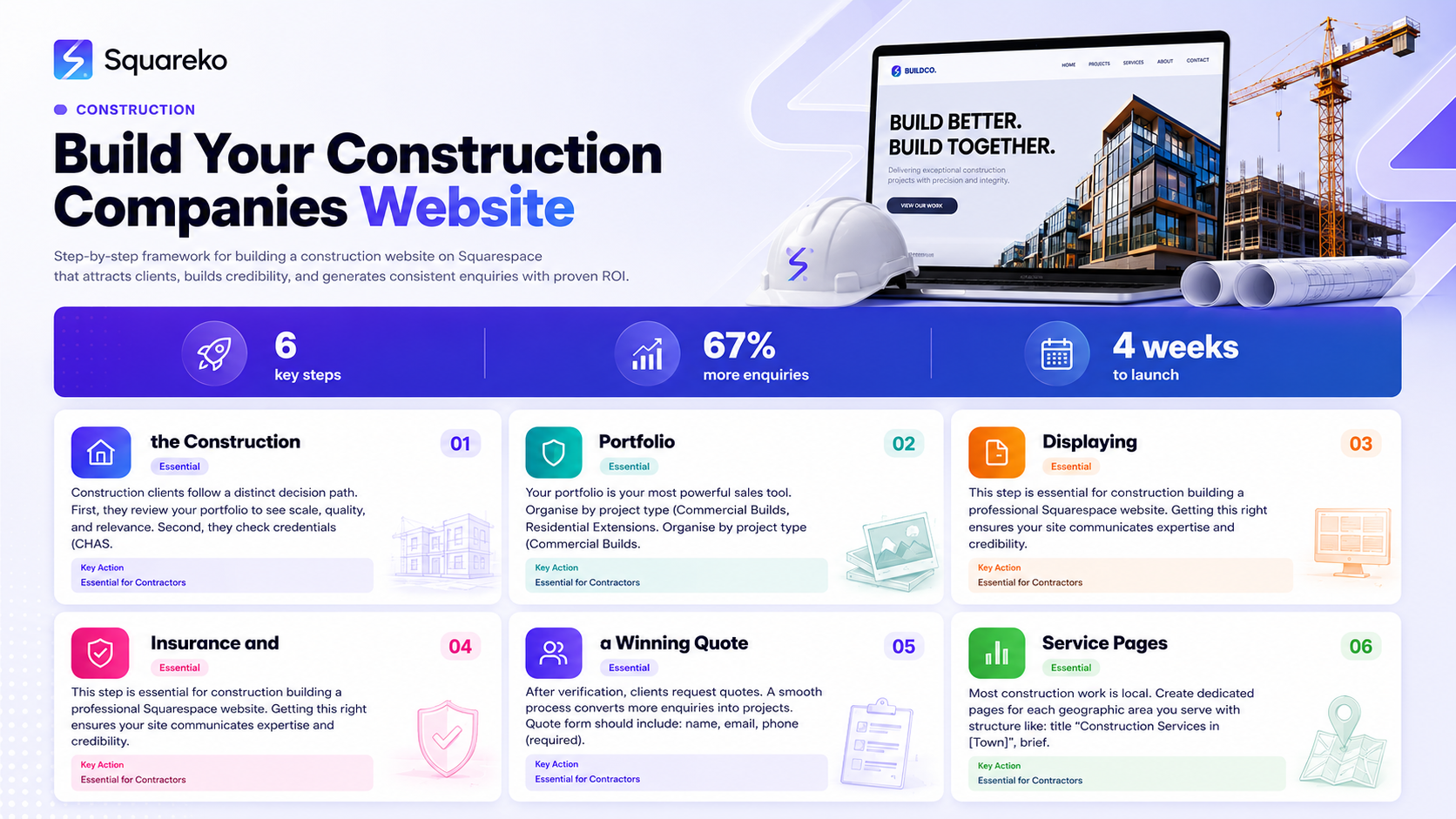
Construction clients follow a distinct decision path. First, they review your portfolio to see scale, quality, and relevance. Second, they check credentials (CHAS, Constructionline, Safe Contractor)—certifications signal safety compliance and may be mandatory. Third, they verify public liability insurance, professional indemnity, and trading licences before signing contracts. Finally, they request quotes with clear contact information and smooth submission processes. Your Squarespace website must address each stage explicitly; missing stages push clients to competitors.
Building a High-Converting Project Portfolio on Squarespace
Your portfolio is your most powerful sales tool. Organise by project type (Commercial Builds, Residential Extensions, Renovations) rather than chronology—this helps clients find relevant work immediately. Invest in professional construction photography including before-and-after shots, detail photos, and wide-angle views. Squarespace handles lightboxes and responsive sizing automatically. Each portfolio entry should include project name, location, client type, project value range, key challenges, materials and methods, timeline, team size, and measurable outcomes. Add client testimonials with photos next to each project for dramatic conversion increases. Use Squarespace's Gallery blocks with linked project pages—create a main portfolio page with grid thumbnails linking to detailed project pages containing full details, testimonials, and CTAs.
Displaying Accreditations and Credentials: The Trust Factor
Construction clients evaluate risk; displaying accreditations removes major objections. Key UK accreditations include CHAS (safety standards), Constructionline (pre-qualification scheme), SafeContractor (health and safety commitment), NHBC Warranty (residential structural protection), and trade-specific certifications. Display accreditation logos on your homepage header, footer, and in a dedicated "Accreditations" section. Use Squarespace's image blocks in logo bars or grids—logos are visual proof that stick in minds better than written claims. Link each logo to brief explanations of what the accreditation means to clients.
Insurance and Licence Verification: Building Client Confidence
Construction clients legally verify insurance before awarding contracts. Display public liability insurance (policy number, amount, expiry, insurer), employer's liability insurance (if you have employees), professional indemnity insurance (if applicable), and trading licences (Companies House registration, VAT number, LABC registration). Create a dedicated "Insurance & Credentials" page or About section. Use table format for clarity. Squarespace's table blocks format this neatly. Never ask clients to chase insurance details—publishing them upfront removes a common barrier to project award.
Creating a Winning Quote Request Process
After verification, clients request quotes. A smooth process converts more enquiries into projects. Quote form should include: name, email, phone (required), project location, project type (dropdown), project description (textarea), budget range (optional), timeline, and referral source (optional). This gives enough info to qualify leads without overwhelming clients. CTA placement: "Get a Free Quote" in hero section and mid-page (homepage); "Request a quote" after each project (portfolio pages); "Send us your project details below, and we'll respond within 24 hours" (contact page). Form confirmation: "Thanks for your enquiry. We'll review your project details and contact you within 24 hours with next steps." This transparency builds confidence. Squarespace's Form block integrates directly, routing submissions to your business email with optional CMS storage.
Optimising Service Area Pages for Local Search
Most construction work is local. Create dedicated pages for each geographic area you serve with structure like: title "Construction Services in [Town]," brief introduction, 3–5 local portfolio projects, local client testimonials, local accreditations, and CTA: "Get a free estimate for your [Town] project." Include town name 3–5 times naturally in content, headings, and image alt-text for local SEO. For multiple towns, use Squarespace Collections to create scalable templates, filling in town-specific content for each page.
Converting Website Visitors into Project Enquiries
Homepage priority order: hero with CTA, company introduction, portfolio grid (6–8 projects), accreditation logos, client testimonials, secondary CTA, FAQ section, final CTA. Visitors decide within seconds; show your best work immediately, build trust, then ask for action. Avoid generic messaging ("We deliver quality builds"). Focus on client outcomes: "We complete projects on time, within budget, to exact specifications," "Our CHAS and Safe Contractor credentials mean zero safety corners," "Full public liability insurance guarantee on every project." These statements address construction clients' three key fears: delays, cost overruns, and safety issues.
Essential Construction Website Conversion Checklist
Portfolio: 8+ projects by type, before/after photos, client testimonials, descriptions mentioning budget/timeline/achievements, professional photography. Credibility: accreditation logos, insurance details (policy/amount/expiry), employer's liability, Companies House/VAT numbers, trading history. Conversions: quote form on homepage and key pages, project type/budget/timeline fields, high-contrast CTAs, visible contact info, testimonials with names/photos. Technical: mobile-responsive, page speed under 3 seconds, working links, forms without errors, email notifications. SEO: focus keyword in title/meta/H1, internal linking to service pages, image alt-text, FAQ section (6–8 questions), local service area pages. Complete this checklist before publishing.
-
Navigate to your Squarespace site editor. Create a new page or section where you'd like the portfolio. Add a Gallery block, then upload project photos. For each project, create a linked project page with full description, testimonials, and a CTA button. This approach gives you gallery thumbnails that link to detailed project pages—ideal for construction businesses where details matter.
-
"Request a Free Quote" and "Get Your Estimate" convert best for construction websites because they're specific and lower barriers to action. Avoid vague CTAs like "Contact Us." Use contrasting colours (bright green or orange against dark backgrounds), position CTAs above the fold and again mid-page, and keep form fields minimal. Test different copy and monitor which gets more clicks.
-
Most construction companies should not list fixed prices because projects vary widely. Instead, publish a pricing range or a guide: "Typical extension costs £50k–£100k depending on size and specification." This sets expectations and filters out unsuitable enquiries. Always offer a free quote process rather than relying on price lists.
-
Create a dedicated page for each town you serve (e.g., "Builders in Manchester"). Include the town name 3–5 times naturally in the content, add local testimonials, and feature local projects. Use Squarespace's local SEO settings: ensure your business address is correct in the footer and site settings. Schema markup (structured data) also helps—Squarespace supports basic schema, and you can add custom code for LocalBusiness schema.
-
Use high-resolution logo images arranged in a grid or row. Place them on your homepage (header or hero area), in a dedicated "Accreditations" page, and in the footer. Don't just list text—logos are visually memorable. Squarespace's Image Grid block is perfect for this. Link each logo to a brief explanation of what the accreditation means to clients.
-
Aim to add a new project every 1–3 months. This keeps the site fresh and gives you content to promote on social media. If you have limited new projects, feature detailed case studies of past work instead of constantly adding new photos. Google favours regularly updated sites, so even monthly blog posts about construction trends can help SEO.
-
Site visitors include on-site project managers checking your portfolio on mobile, office-based clients on desktop, and potential clients on tablets. Squarespace automatically responds to all screen sizes, but test your site on an iPhone and Android device to ensure forms work, CTAs are clickable, and images load properly.
How-To Schema: Building Your Construction Website on Squarespace
{
  "@context": "https://schema.org",
  "@type": "HowTo",
  "name": "How to Build a Construction Company Website on Squarespace",
  "description": "Step-by-step guide to building a construction website that converts leads into projects.",
  "step": [
    {
      "@type": "HowToStep",
      "position": 1,
      "name": "Set Up Your Squarespace Site",
      "text": "Choose a construction-focused template, set up your domain, and configure basic site settings including business name, address, and contact details."
    },
    {
      "@type": "HowToStep",
      "position": 2,
      "name": "Create Your Project Portfolio",
      "text": "Collect 8+ project photos and details. Organise by project type. Create a portfolio gallery page with linked project detail pages including testimonials."
    },
    {
      "@type": "HowToStep",
      "position": 3,
      "name": "Display Accreditations and Credentials",
      "text": "Add accreditation logos (CHAS, Constructionline, SafeContractor) to your homepage and footer. Create a dedicated credibility section with descriptions."
    },
    {
      "@type": "HowToStep",
      "position": 4,
      "name": "Add Insurance and Verification Details",
      "text": "Create an Insurance & Credentials page listing public liability, employer's liability, trading numbers, and VAT registration with expiry dates."
    },
    {
      "@type": "HowToStep",
      "position": 5,
      "name": "Set Up Quote Request Form",
      "text": "Add a Squarespace Form block with fields: name, email, phone, project type, project description, budget range, timeline. Configure confirmation message."
    },
    {
      "@type": "HowToStep",
      "position": 6,
      "name": "Optimise for Local Search",
      "text": "Create service area pages for main towns you serve. Include local testimonials and projects. Configure LocalBusiness schema in site settings."
    },
    {
      "@type": "HowToStep",
      "position": 7,
      "name": "Add Testimonials and Social Proof",
      "text": "Collect client testimonials with names and photos. Embed them on your homepage and in portfolio project pages."
    },
    {
      "@type": "HowToStep",
      "position": 8,
      "name": "Test and Optimise",
      "text": "Test forms on mobile and desktop. Check page load speed. Verify links work. Monitor form submissions. Make iterative improvements based on visitor behaviour."
    }
  ]
}
Conclusion
Building a construction company website on Squarespace that wins more projects isn't about aesthetics alone. It's about removing barriers between potential clients and project award.
Clients follow a predictable path: they review your portfolio, check your credentials, verify your insurance, and then request a quote. When your website guides them through each of these stages clearly, you convert more leads into projects.
Squarespace provides all the tools you need—portfolio galleries, form builders, accreditation display areas, and mobile-responsive design. The difference between a website that generates 3 enquiries a month and one that generates 15 is strategic structure and honest transparency.
The elements outlined here—detailed portfolios, visible accreditations, clear insurance information, and frictionless quote forms—aren't optional. They're essential. When competitors skip these elements, they lose clients to you. When you implement them fully, you win projects your competitors miss.
Start with the conversion checklist. Audit your current site against each item. Build the gaps. Then watch your project pipeline improve.
Ready to Build Your Construction Website?
Your website is your 24/7 salesperson. It should convert.
At Squareko, we design construction company websites on Squarespace that are built to win projects, not just impress visitors. We understand the construction client journey, we know which elements drive conversions, and we've built dozens of high-performing construction sites for builders, contractors, and specialists across the UK.
Whether you're starting from scratch or redesigning an existing site, we can help you build something that generates consistent, qualified enquiries.
Let's talk about your construction website. Schedule a free consultation with our team.

From custom website design to SEO strategy, we help businesses launch a site that looks professional and performs better.

About the Author
I'm Walid Hasan, a Certified Squarespace Expert and Squarespace Circle Platinum Partner with over 12 years of hands-on experience designing and optimizing high-performing websites. Over the years, I've had the privilege of building more than 2,000 Squarespace websites for clients around the world, always focusing on clean design, strong user experience, and conversion-driven results.
