
How to Build a Cleaning Company Website on Squarespace That Gets More Bookings
Introduction:
Your cleaning business deserves a website that doesn't just look professional—it converts visitors into paying clients. A cleaning company website on Squarespace gets more bookings when it addresses the specific concerns of homeowners searching for reliable cleaning services. In this complete guide, we'll show you exactly how to build a Squarespace website that turns prospective customers into regular clients.
Key Takeaways
Trust signals matter most: Homeowners seek verifiable credentials, customer reviews, and clear contact information before booking a cleaner.
Pricing transparency increases conversion: Displaying your rates upfront removes friction and attracts qualified leads willing to pay your rates.
Mobile-optimised booking processes reduce abandonment: Squarespace's responsive design ensures potential clients can book seamlessly on any device.
Recurring appointment scheduling is essential: Use Squarespace Scheduling to set up automated weekly and fortnightly cleaning slots, reducing back-and-forth emails.
Strong CTAs drive action: Strategic, benefit-focused calls-to-action can increase booking enquiries by 30% or more.
Case studies and testimonials build confidence: Real results and customer stories overcome objections faster than marketing copy alone.
Service scope clarity prevents cancellations: Detailed explanations of what you clean and what you don't reduce mismatched expectations.
Why Squarespace for Your Cleaning Business
Before diving into the specifics, let's understand why Squarespace stands out for cleaning companies. Squarespace provides:
Built-in scheduling and booking tools that integrate directly with your site
Professional templates designed for service businesses
Mobile-first responsiveness essential for customers searching on phones
Integrated payment processing for deposits and full payments
Customer relationship management basics to track enquiries and bookings
Email marketing integration for appointment reminders and upselling
Squarespace for cleaning company bookings works because the platform handles both the aesthetic and functional needs of a service business. You don't need multiple tools cobbled together—everything lives in one system, making management straightforward.
Section 1: Establish Trust Through Credentials and Reviews
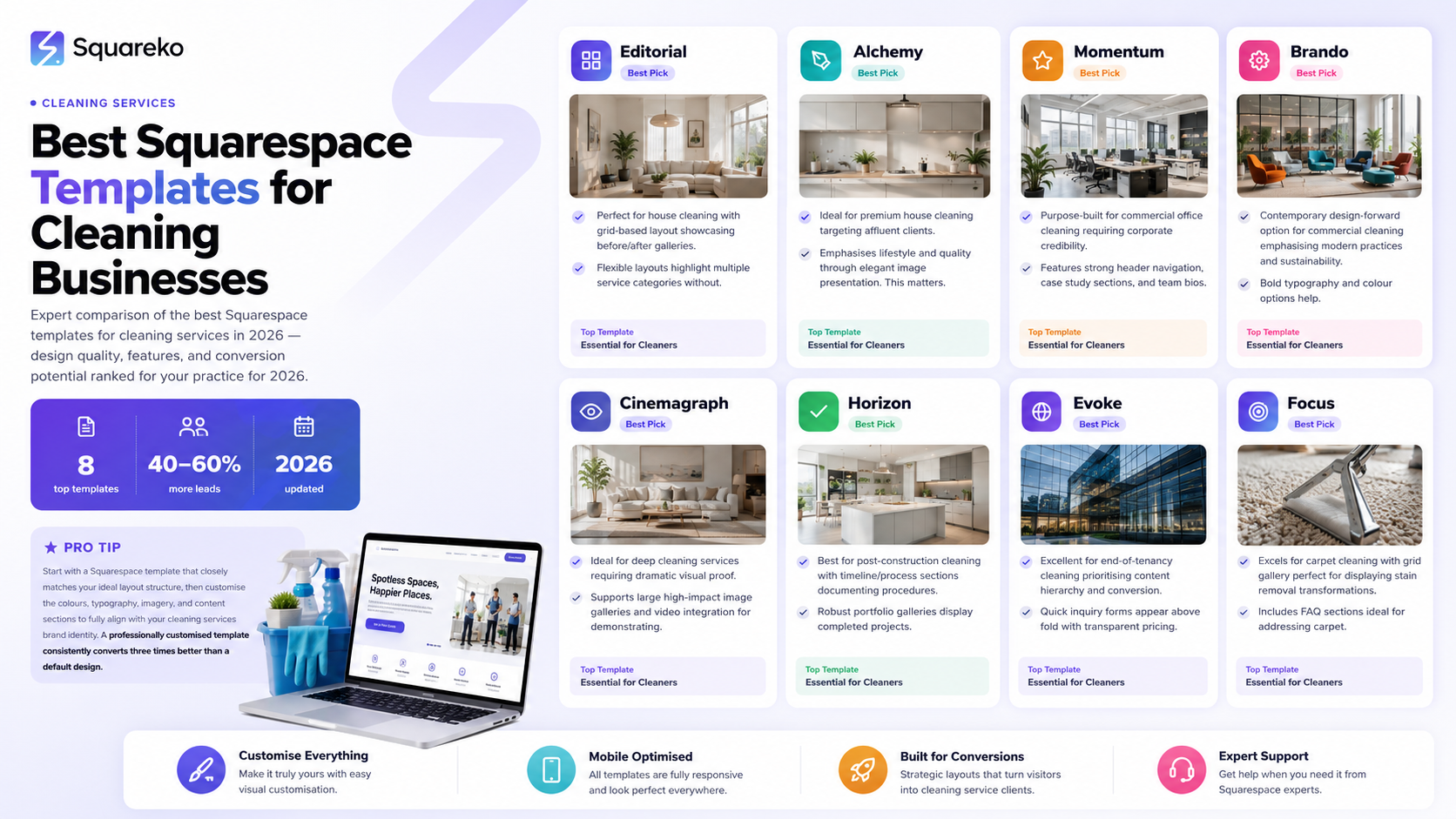
Homeowners won't book a cleaning service from a stranger. Trust is the first barrier you must overcome.
Add an "About Us" Section with Team Photos
Create an About page that introduces your cleaning team by name. Include professional headshots of key staff members, brief bios, and years of experience. This humanises your business and reassures clients they're hiring real people, not a faceless corporation.
Squarespace allows you to embed team member profiles easily:
Use a gallery or timeline feature to showcase your team
Include certifications (e.g., DBS clearance, health and safety training)
Mention any memberships in industry organisations
Display Customer Testimonials Prominently
Position 3–5 high-quality customer testimonials on your homepage and service pages. Use Squarespace's testimonial or review blocks to feature:
Customer name and location
Specific praise about your service
Star ratings or "5-star verified" badges
Add Trust Badges and Certifications
Include visible badges for:
Insurance coverage
DBS clearance or background check
Industry certifications
Member affiliations
Position these prominently in your header or footer so visitors see them immediately.
Create a Frequently Asked Questions Block
Address common concerns early: Are you insured? Can you access my property safely? What happens if I'm unhappy? Do you provide references?
This FAQ block should appear on your main service pages, not hidden away.
Section 2: Clarify Your Service Scope and Specialisations
Homeowners often abandon websites when service details are vague. Clarity eliminates wasted enquiries and unsuitable prospects.
Create Detailed Service Pages
Build a separate page for each main service you offer:
Regular domestic cleaning (weekly, fortnightly, monthly)
Deep cleaning (one-off, thorough, move-in/move-out)
Specialist services (carpet cleaning, upholstery, commercial)
Spring cleaning packages
For each service, include:
What's included: List exactly what you clean in a typical visit .
What's not included: Be honest about boundaries. For example: Oven cleaning, external windows, and garden maintenance are available as add-ons.
Time required: State how long a standard clean takes for different property sizes.
Pricing for this service: Show the exact cost, or a clear pricing range.
Use Schema Markup for Service Definitions
Squarespace allows custom code insertion. Add structured data (schema.org/Service) so search engines understand your offerings. This improves your visibility when homeowners search for specific services.
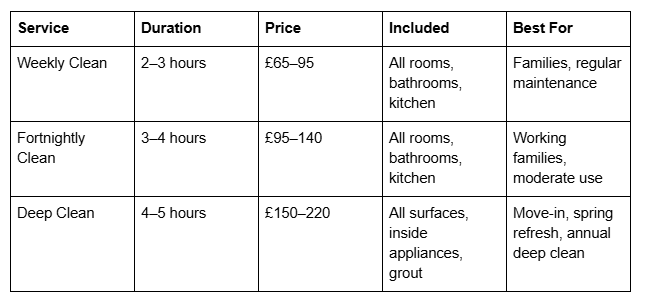
Create a Pricing Comparison Table
If you offer multiple service tiers, use a table format to make comparisons clear:
Section 3: Display Transparent Pricing That Attracts the Right Clients
Pricing transparency is non-negotiable. Should a cleaning company show prices on their website? Absolutely. Here's why:
The Case for Showing Prices
Qualified leads only: Prospects who see your prices and still enquire are genuinely interested and can afford you.
Faster decision-making: No time wasted requesting quotes for prices outside their budget.
Competitive advantage: Most cleaning websites hide prices. Being transparent makes you stand out as confident and honest.
Reduced support burden: Fewer generic "how much?" email enquiries, more genuine booking requests.
Pricing Display Best Practices
1. Show a base price with variables clearly stated
"Standard weekly clean for a 3-bedroom semi: £75. Price varies by property size, number of rooms, and cleaning frequency."
2. Offer a pricing calculator or form
Squarespace allows forms that feed into your CRM. Create a simple form:
Number of bedrooms
Number of bathrooms
Preferred cleaning frequency
Special requests
This automatically shows a ballpark price and captures leads.
3. Highlight pricing transparency as a selling point
In your homepage headline: "Transparent Pricing. No Hidden Fees. Book Your Clean Today."
4. Include a "Price Match" or "Custom Quote" option
For unusual situations (large properties, commercial spaces, specialty requests), offer a quick custom quote form.
5. Show what's included in the price
Example: "Your £85 fortnightly clean includes: bathrooms (scrub and polish), kitchen (appliances and surfaces), bedrooms (vacuum and dust), living areas (vacuum and dust), hallways and stairs."
Section 4: Simplify the Booking Experience
A complex booking process loses customers. Squarespace Scheduling makes it simple.
Enable Squarespace Scheduling for Direct Bookings
Squarespace Scheduling integrates directly into your website. Visitors can:
Choose a service from a dropdown
Select their preferred date and time from your available slots
Enter their address and contact details
Pay a deposit (optional) or prepay full amount
Receive an instant confirmation and reminder emails
This reduces friction dramatically compared to "send us an enquiry and we'll call you back."
Design a One-Page Booking Form
If you prefer a contact-to-quote flow:
Service type (required dropdown)
Property type (house, flat, commercial)
Number of bedrooms/bathrooms
Preferred frequency (weekly, fortnightly, monthly, one-off)
Preferred day and time window
Special requests or allergies (free text)
Contact name, email, phone, postcode
Keep it to 7–9 fields maximum. Every extra field reduces completion rates.
Add a Clear CTA Button
Use a high-contrast, benefit-focused button: "Book My Clean Now" or "Get My Free Quote in 2 Minutes" instead of generic "Submit."
Provide Multiple Booking Paths
Some customers want to book instantly; others prefer to call or email:
Squarespace Scheduling for instant self-service bookings
Phone number prominently displayed (use click-to-call on mobile)
Email address for complex queries
WhatsApp link for quick questions
Reduce Friction on Mobile
Test your booking flow on a smartphone. Ensure:
Form fields are touch-friendly (large enough to tap)
Buttons are full-width or large
No unnecessary pop-ups
Page load speed is fast (aim for under 3 seconds)
Section 5: Optimise for Recurring Cleaning Appointments
Recurring bookings are the lifeblood of a cleaning business. They're predictable, require less marketing effort, and generate consistent revenue. Squarespace Scheduling supports this perfectly.
Set Up Recurring Appointment Slots
In Squarespace Scheduling:
Create service types for each cleaning option .
Define availability windows:
For weekly cleaning: Create slots every Monday, Wednesday, and Thursday, 9 AM–5 PM, staggered by 2-hour blocks
For fortnightly: Create slots every other week on the same day
Set up recurring bookings as subscriptions:
Squarespace allows customers to book recurring appointments
Configure automatic reminders 24 hours before each appointment
Enable automatic payment collection on each booking date
Use time blocks that match your team's capacity:
If you have one cleaner, allow one booking per day
If you have three cleaners, allow up to three simultaneous bookings
Create a "Subscribe to Your Clean" Option
Highlight a special discount for customers who commit to recurring cleaning:
"Book a weekly clean for 12 weeks and save 15%. Set it and forget it—we'll handle the rest."
This incentivises customers to choose recurring appointments, which is easier than converting one-time clients repeatedly.
Automate Reminders and Follow-Ups
Configure Squarespace's email automations:
24-hour pre-appointment reminder: "Your clean is tomorrow at 2 PM. Any last-minute changes? Reply here."
Post-appointment survey: "How was your clean? Share feedback to claim a £10 credit."
Upsell email (after 4 weeks): "Your carpets could use a deep clean. Book add-on upholstery cleaning."
These touchpoints build relationships and uncover opportunities for additional services.
Display a "Recurring Booking" Success Story
Highlight a case study customer who switched from one-off bookings to weekly cleaning. Show:
Their initial concern
How recurring bookings work
Their result
Section 6: Showcase Social Proof and Case Studies
Feature a Cleaning Company Case Study with Booking Metrics
Case Study: From 3 Bookings per Month to 45 Recurring Clients
The Situation: Coastal Cleaning, a 5-person team in Brighton, had a basic website with no booking system. Enquiries came via email, and the team spent 10+ hours per week responding to questions and sending quotes.
The Solution: They rebuilt their website on Squarespace, implementing:
Transparent pricing for all services
Squarespace Scheduling for instant bookings
Service pages clarifying what's included and not included
Customer testimonials on the homepage
A subscription discount (15% off for 12+ weeks)
The Results:
45 recurring weekly clients within 6 months (up from 3 non-recurring bookings per month)
6 hours saved per week on administrative tasks
Revenue increased by 260% within the first year
95% customer retention rate for recurring clients
Referrals increased by 40% as happy customers recommended them to friends
The key to their success? They stopped treating every cleaning as a one-off transaction. Instead, they built a system that made recurring bookings the default option, and they made it easy for customers to commit.
Add Video Testimonials
If possible, record short 15–30 second videos of real customers talking about your service:
"I've had Sarah clean my house every week for two years. I'll never go back to doing it myself."
"The team is professional, friendly, and incredibly thorough."
Embed these on your homepage and service pages using Squarespace's video blocks.
Display Before/After Photos
For deep cleaning or specialist services, show before/after images of customer spaces:
Bathroom before (stained, grimy) and after (sparkling)
Carpet before (matted, discoloured) and after (fresh, vibrant)
Kitchen before (cluttered, greasy) and after (pristine)
This visual proof is more persuasive than any copy.
Create a "Reviews" Page
Squarespace allows you to integrate Google Reviews, Trustpilot, or Feefo. Dedicate a full page to reviews, sorted by date, rating, and service type. This transparency builds immense trust.
Frequently Asked Questions
-
Use Squarespace Scheduling. Log into your site editor, select the Scheduling app, and create service offerings with availability windows. Then insert a scheduling block on your homepage or services page. Customers can instantly select a date, time, and service, then pay a deposit or full amount. Squarespace handles payment processing, confirmation emails, and reminders automatically.
-
Benefit-focused CTAs outperform generic ones. Instead of "Contact Us," try "Book My Clean Now," "Get a Free Quote in 2 Minutes," or "Claim Your First Clean at 20% Off." The best CTA speaks directly to the customer's desire (convenience, savings, or peace of mind). A/B test different versions on your homepage to see which drives the most clicks.
-
Yes, absolutely. Showing prices filters out unsuitable prospects, attracts qualified leads who can afford you, and positions you as transparent and confident. Companies that hide prices often lose potential customers to competitors who display them openly.
-
Offer a discount for recurring bookings: "Save 15% on weekly cleaning when you commit to 12 weeks." Make recurring the default recommendation: "Most of our clients book weekly cleaning because it's more cost-effective and keeps their home perpetually clean." Highlight how recurring bookings free up time and reduce stress. Use social proof: share testimonials from long-term clients.
-
Set a cancellation policy during the scheduling setup (e.g., "48-hour notice required for free cancellation; less than 48 hours incurs a £15 fee"). Squarespace allows customers to reschedule directly through the confirmation email or their account. You can configure automatic emails for policy details.
-
Minimum required: name, phone, email, address (for the clean), preferred date/time, and service type. Optional but valuable: number of bedrooms, allergies/sensitivities (pets, fragrance preferences), access instructions, and special requests. Keep it short—too many fields reduce completion rates.
-
Yes. You can require full payment, a deposit, or optional payment at booking. You can also collect payment manually later. Squarespace integrates with Stripe and PayPal, so funds appear in your account within 1–2 business days.
-
Use a contact form with conditional fields: ask "How many bedrooms?" then display the corresponding price. Alternatively, create separate service offerings in Squarespace Scheduling (e.g., "3-Bed Clean—£75," "4-Bed Clean—£95") and let customers choose.
Next Steps: Start Building Your High-Converting Site
You now have a complete blueprint for building a cleaning company website on Squarespace that converts visitors into recurring clients. The steps are clear:
Establish trust with credentials, reviews, and team photos
Clarify your service scope with detailed service pages
Show transparent pricing to attract qualified leads
Simplify booking with Squarespace Scheduling
Optimise for recurring appointments with subscriptions and discounts
Showcase social proof with testimonials and case studies
The difference between a website that generates a handful of enquiries and one that fills your schedule with recurring clients is implementation. Most cleaning companies know these principles but don't act on them consistently.
Ready to build your high-converting Squarespace site? Start with Squarespace Scheduling today. Set up three service offerings, add your first five customer testimonials, and display your pricing prominently. Within 30 days, you'll notice an increase in qualified enquiries and recurring bookings.
If you'd like expert help designing and optimising your cleaning company website, Squareko specialises in Squarespace sites for service businesses. We've helped dozens of cleaning companies increase their bookings by 200%+ through strategic design, conversion optimisation, and recurring booking systems.

From custom website design to SEO strategy, we help businesses launch a site that looks professional and performs better.

About the Squareko Editorial Team
I'm Walid Hasan, a Certified Squarespace Expert and Squarespace Circle Platinum Partner with over 12 years of hands-on experience designing and optimizing high-performing websites. Over the years, I've had the privilege of building more than 2,000 Squarespace websites for clients around the world, always focusing on clean design, strong user experience, and conversion-driven results.
