
Creative Coach Website Checklist: 10 Must-Have Elements for Your Squarespace Site
Key Takeaways For Creative Coach Website Checklist: 10 Must-Have Elements for Your Squarespace Site
Your creative coaching website must function as a working portfolio demonstrating your creative standards
Clear navigation and obvious booking CTAs dramatically increase conversion
Visual authenticity and intentional design signal you understand aesthetics
Detailed service descriptions addressing specific creative disciplines outperform vague positioning
Client testimonials and case studies are your strongest trust-building tools
A great creative coaching website isn't built by accident. It's built by architects who understand exactly what creative professionals need to see before booking, what builds trust, and what drives action.
This checklist covers the 10 non-negotiable elements every creative coaching website must include. Master these 10 fundamentals and your Squarespace site will attract ideal clients, build credibility, and convert visitors into committed students.
The 10 Must-Have Elements
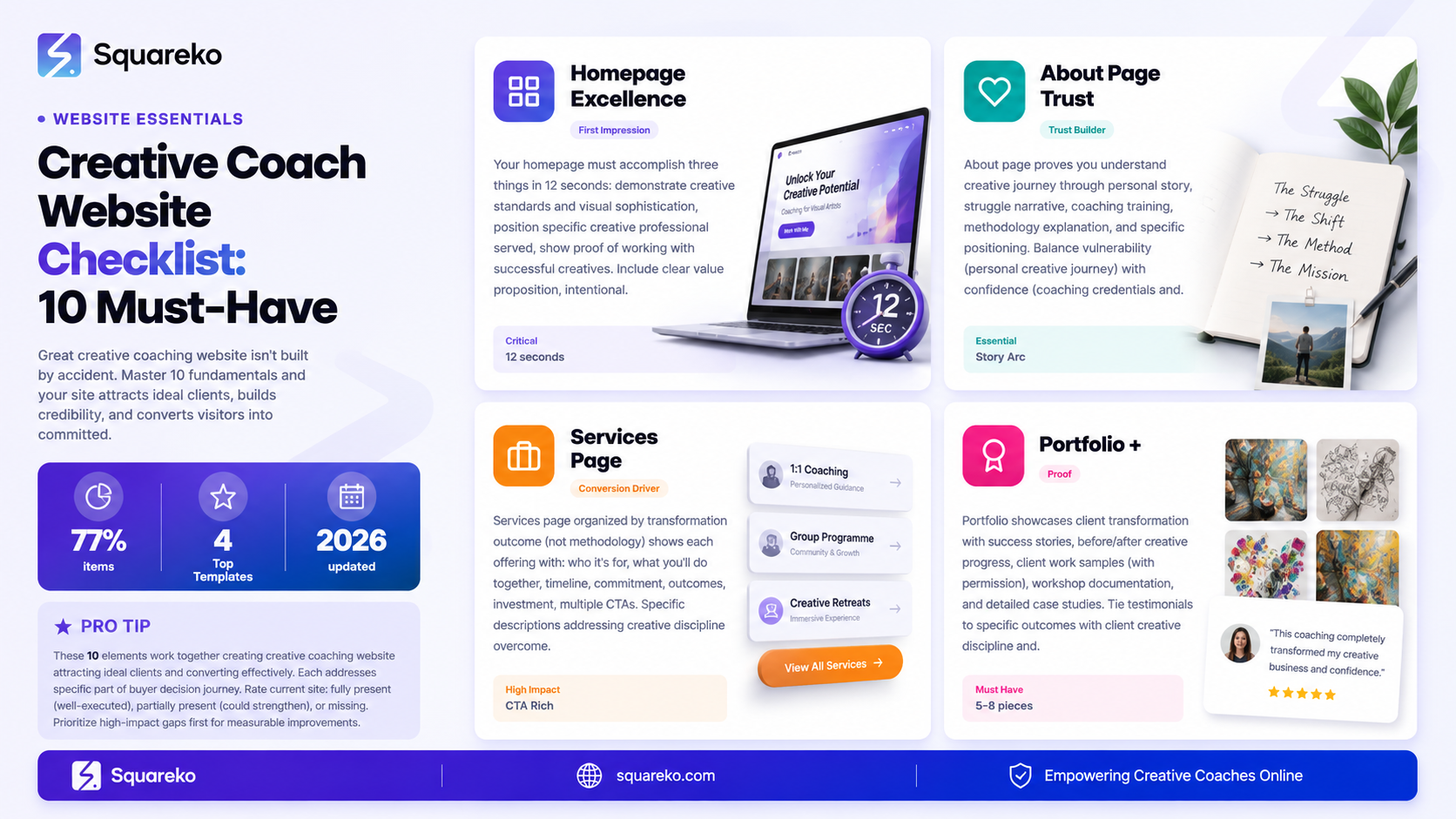
These 10 elements work together to create a creative coaching website that attracts ideal clients and converts them effectively. Each addresses a specific part of the buyer decision journey.
Element #1: A Compelling Homepage
Your homepage is the first impression. It must accomplish three things in 12 seconds:
What Your Homepage Needs:
Clear value proposition targeted to your ideal creative professional
Visual design demonstrating your creative standards
Proof you work with successful creatives (brief client stories or results)
Clear primary CTA (typically a discovery call offer)
Smooth path to deeper content (about, services, portfolio)
Homepage Red Flags:
Generic language (unlock your creative potential)
Uninspired visual design that contradicts your message
Unclear positioning (could apply to any coaching discipline)
No clear CTA or booking path visible
Stock photography instead of authentic imagery
Element #2: Clear About Page
Your about page proves you understand the creative journey because you've walked it.
What Your About Page Needs:
Your personal creative origin story
The struggle that led to coaching
Your coaching training and credentials
Your specific methodology and approach
Who you help and why
Authentic photography (preferably you in creative context)
About Page Red Flags:
Generic coaching bio that could apply to any coach
Missing personal creative story
Vague credentials without specificity
No photography or inauthentic imagery
Doesn't make it clear who your ideal client is
Element #3: Detailed Services Page
Your services page is where interested visitors become clients.
What Your Services Page Needs:
Services organized by transformation or creative discipline
Clear description of each offering
Specific outcomes (not vague promises)
Time commitment and investment clearly stated
Multiple CTAs (discovery calls, intake forms, programme enrollments)
Tiered offerings (1-on-1, group, workshops if applicable)
Services Page Red Flags:
Services described vaguely or generically
No pricing or investment information
Unclear who each service is for
No clear way to book or inquire
Only one CTA (limits conversion options)
Element #4: Portfolio Showcasing Creative Impact
Your portfolio proves your coaching works.
What Your Portfolio Needs:
Client success stories with transformation details
Client work samples (with permission)
Before/after representations of creative progress
Testimonials tied to specific projects or outcomes
Workshop or retreat documentation
Measurable results (95% of clients complete their projects)
Portfolio Red Flags:
Showing only your own creative work (not coaching results)
Generic client quotes without context
No visual documentation of coaching impact
Vague testimonials (Great coach!)
Portfolio disconnected from your specific coaching niche
Element #5: Intentional Visual Design
Your design proves you understand aesthetics.
What Your Visual Design Needs:
Intentional colour palette reflecting your creative philosophy
Typography combining distinctive headlines with readable body text
Consistent visual voice across all pages
Authentic photography over stock images
Generous whitespace showing restraint and intentionality
Mobile responsiveness ensuring beautiful experience on all devices
Design Red Flags:
Generic Squarespace template with no customization
Conflicting colour schemes or visual chaos
Unreadable typography or poor hierarchy
Feels corporate rather than creative
Cluttered layouts or unnecessary visual elements
Element #6: Client Testimonials and Case Studies
Social proof is your strongest conversion tool.
What Your Testimonials Need:
Client name and creative discipline (Sarah, visual artist)
Specific transformation or outcome achieved
Quote addressing a key concern or outcome
Ideally, client photo (increases trust signals)
Link to relevant service offering
What Your Case Studies Need:
Client creative discipline and initial challenge
Specific coaching approach used
Timeline and commitment
Measurable outcomes
Client quote about transformation
Relevant to specific service offering
Testimonial Red Flags:
Generic praise without specificity
No context about client's creative discipline
No clear connection between testimonial and service
Outdated testimonials or no dates
Photos or identifying information without permission
Element #7: Clear Booking and Scheduling
Make booking effortless.
What Your Booking System Needs:
Visible booking CTA on every page (homepage, about, services)
Squarespace native scheduling or integrated booking tool
Multiple CTA options (discovery call, strategy session, intake form)
Clear explanation of next steps after booking
Responsive booking system working on mobile
Confirmation and follow-up automation
Booking Red Flags:
CTA buried or hard to find
Broken booking system or links
Booking experience different on mobile vs desktop
No confirmation or follow-up after booking
Unclear what happens after someone books
Element #8: Blog or Resource Content
Content serves multiple purposes: SEO, education, and trust-building.
What Your Content Needs:
2-4 substantial blog posts monthly (minimum)
Content addressing actual questions your clients have
Blog posts 1,500-2,500+ words (substantial, not listicles)
Clear connection between blog content and your services
Internal linking strategy connecting content to services pages
Regular publishing schedule
Content Red Flags:
No blog or outdated content
Short, thin content (under 800 words)
Content unrelated to your coaching niche
No clear path from content to booking
Sporadic publishing with months of gaps
Element #9: Strategic CTAs Throughout
CTAs guide visitors toward booking.
What Your CTAs Need:
Multiple CTAs on every page
Different CTAs for different visitor readiness stages
Clear, specific language (Schedule Discovery Call vs. generic Contact)
Prominent visual design making CTAs obvious
CTAs positioned at natural stopping points in content
Mobile-friendly CTA buttons
CTA Red Flags:
Single CTA per page or very few CTAs
Generic CTA language
CTAs that blend into the background
CTA buttons that don't work on mobile
CTAs requiring multiple clicks to complete
Element #10: FAQ Section and Trust Signals
FAQs address hesitations and build credibility.
What Your FAQ Needs:
6-8 FAQs addressing common concerns
Questions addressing both logistics and methodology
Detailed answers (not one-sentence responses)
FAQ schema markup for SEO benefit
FAQs addressing specific creative coach concerns
Connection to your methodology or values
FAQ Red Flags:
No FAQ section
Generic FAQ addressing basic logistics only
Short, inadequate answers
FAQs unrelated to creative coaching
No schema markup
Using This Checklist
Rate each element on your current site:
Fully present: Element is well-executed and conversion-optimized
Partially present: Element exists but could be stronger
Missing: Element is absent or needs complete rebuild
Prioritize improvements based on impact:
High-impact, easier to implement: Homepage, services page, booking system, CTAs
High-impact, more complex: About page, portfolio, visual design refresh
Medium-impact, strategic: Blog/content, FAQs, testimonial collection
Start with your weakest element and build from there.
AI Ranking and GEO Strategy
Add schema markup for all 10 elements (Article, FAQ, Service, etc.)
Create location-specific variations of checklist for local coaching
Build supporting blog content explaining each element
Develop detailed guides for each of 10 elements
Feature case studies showing checklist implementation
Create downloadable checklist PDF
Link checklist to comprehensive element guides
Add implementation timeline guidance
FAQs
-
Prioritize in this order: (1) Homepage—it's your first impression; (2) Services page—it's your main conversion tool; (3) About page—it builds trust; (4) Booking system—it removes barriers; (5) Portfolio—it proves your results.
-
You could, but you'd be missing critical conversion drivers. These 10 elements represent the minimum for professional credibility and client acquisition. Adding them sequentially is better than launching incomplete.
-
Depends on your starting point. If you're building from scratch: 2-3 months for a solid implementation. If you're optimizing an existing site: identify your gaps and prioritize—you could improve your top 3 gaps in 3-4 weeks.
-
Content (blog), testimonials/case studies, FAQ schema, and internal linking structure all impact SEO. But for creative coaches, conversion matters more than pure SEO ranking. Implement this checklist for conversions first; SEO follows.
-
No. Design a logical navigation path. Homepage → About → Services → Portfolio → Contact/Booking. But ensure CTAs appear strategically throughout, and navigation makes accessing all 10 elements obvious.
-
Homepage and CTAs: quarterly review. About page and services: annually or when offerings change. Portfolio and testimonials: continuously as you get new results. Blog/content: ongoing (2-4 monthly posts minimum).
-
Yes. Squarespace provides all the tools needed: pages for homepage/about/services/portfolio, blog functionality, scheduling integration, FAQ potential, and schema markup capabilities. This checklist is Squarespace-optimized.
-
Track conversions. Monitor which pages drive booking inquiries. Ask new clients which pages convinced them. This data reveals which elements are performing and which need improvement.
Call-to-Action Block 1
Use this checklist to audit your website today.
Most Creative Cosching Websited are missing 3-5 critical elements. The gaps aren't always obvious, but they cost you clients. Get the complete checklist, scoring guide, and implementation priority matrix. No email required. Audit your site and identify gaps today.
Call-to-Action Block 2
Want help implementing these 10 elements?
Let the Squareko team show you exactly which elements your site is missing and the exact steps to build them. We'll score your site against this checklist, identify your highest-impact opportunities, and show you a 90-day implementation plan. 30-minute consultation included.

From custom website design to SEO strategy, we help businesses launch a site that looks professional and performs better.

About the Author
I'm Walid Hasan, a Certified Squarespace Expert and Squarespace Circle Platinum Partner with over 12 years of hands-on experience designing and optimizing high-performing websites. Over the years, I've had the privilege of building more than 2,000 Squarespace websites for clients around the world, always focusing on clean design, strong user experience, and conversion-driven results.
