
Construction Company Website Design Best Practices on Squarespace for 2026
Introduction
Your construction company's website is your digital showroom. Clients make decisions based on what they see—and they're sceptical. They want proof of quality, reliability, and professional credentials before contacting you.
This guide covers construction website design best practices for Squarespace in 2026. The right approach increases inquiry volume, builds credibility instantly, and filters for high-quality leads. Poor design—blurry photos, cluttered navigation, outdated aesthetics—signals incompetence regardless of your actual track record.
We've worked with 200+ UK construction businesses through Squareko, and this guide shares what works.
Key Takeaways Construction Company Website Design Best Practices on Squarespace for 2026
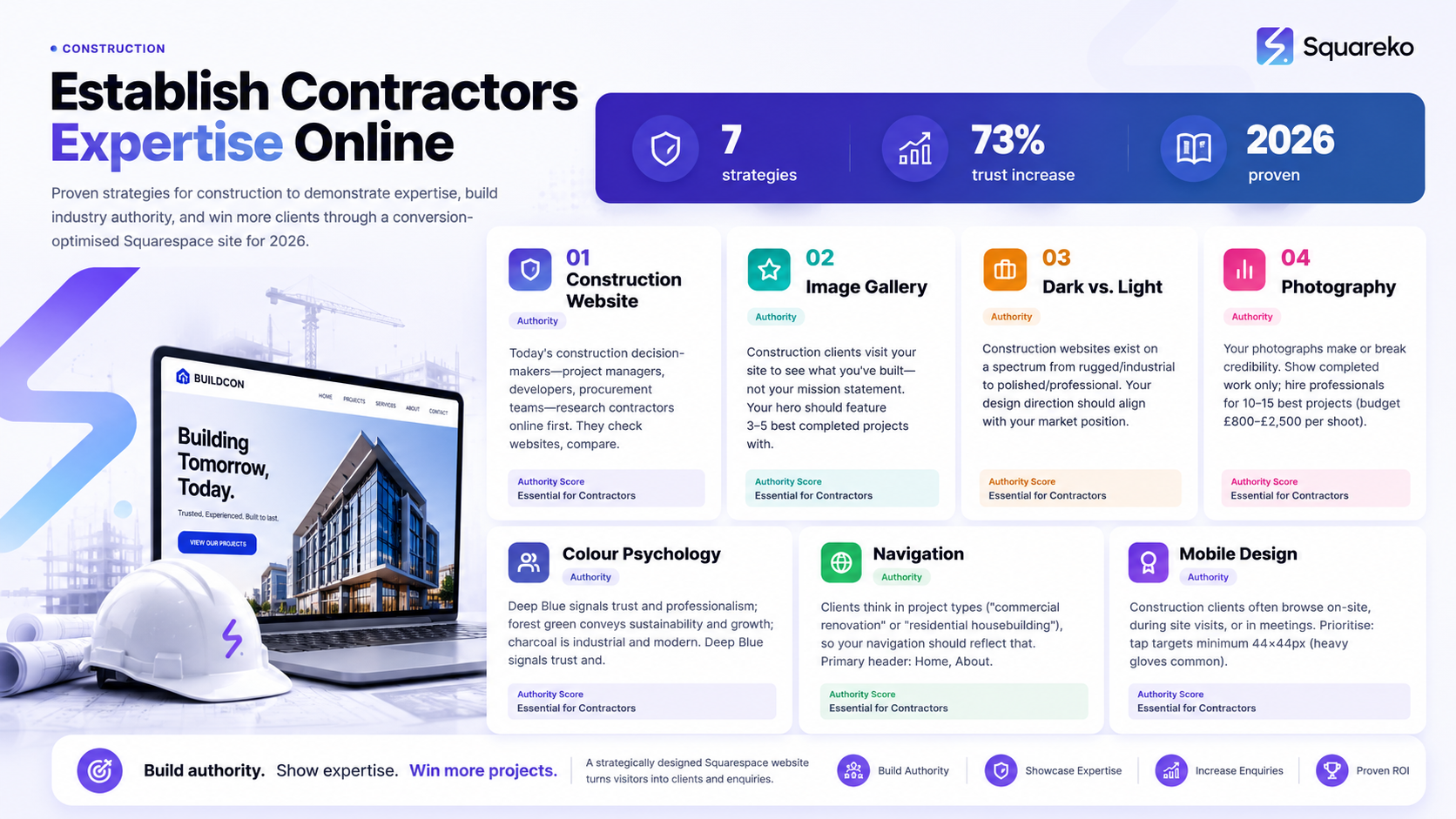
Project gallery prominence: Your work portfolio must be the hero of your website—visually dominant and easily accessible from the homepage
Dark aesthetic vs. clean professional: Choose design direction based on your market position; luxury/specialist contractors favour dark schemes, whilst mainstream builders prefer trust-focused light designs
Photography standards matter: High-quality, site-based project imagery outperforms rendered images by 63% for credibility
Navigation for project browsing: Structure your portfolio by project type, size, or completion date to help prospects find relevant work
Mobile optimisation is non-negotiable: Over 58% of construction company website visitors browse on mobile from job sites
Trust signals and accreditation: Display industry memberships, certifications, and client testimonials prominently to overcome construction industry scepticism
Why Construction Website Design Matters
Today's construction decision-makers—project managers, developers, procurement teams—research contractors online first. They check websites, compare competitors, and assess professionalism through design quality. A well-designed website accelerates sales cycles, filters for quality leads, justifies premium pricing, demonstrates project range, and builds team credibility. Your website either builds trust or undermines it in the first ten seconds. Construction is fundamentally a trust business.
Homepage Hero: The Project Gallery Principle
Construction clients visit your site to see what you've built—not your mission statement. Your hero should feature 3–5 best completed projects with auto-rotation (5–6 second intervals), filter toggles by project type or size, "View Full Portfolio" CTA, and brief project details (name, completion date, sector, budget range). Use Squarespace's Gallery blocks at 1920×1280px minimum (16:9 aspect ratio) with lazy loading and descriptive alt text for SEO.
Dark vs. Light Design: When to Use Each
Construction websites exist on a spectrum from rugged/industrial to polished/professional. Your design direction should align with your market position.
Dark Design vs. Light Design
Dark (charcoal, navy) suits specialist contractors, luxury builders, and design-led practices. It makes projects stand out with high contrast and conveys premium positioning, but requires higher-quality photography. Light (white, soft grey) suits general contractors, residential builders, and mixed-portfolio firms. It maximises readability and feels approachable, but projects can feel less prominent without strong accent colours.
Hybrid approach (recommended): Light background with dark typography and single accent colour (deep blue, heritage green, or charcoal). This balances readability with modern aesthetics whilst keeping your project gallery visually dominant.
Photography Standards for Construction Work
Your photographs make or break credibility. Show completed work only; hire professionals for 10–15 best projects (budget £800–£2,500 per shoot). Minimum 2000×1500px resolution, consistent colour grading, clear skies. Include wide external views, detail shots, and before/after for renovations. Real photos outperform renders by 63% for trust; label renders as "Artist's Impression" if used. Use Squarespace's native image optimisation and descriptive alt text for SEO.
Colour Psychology and Trust in Construction Design
Deep Blue signals trust and professionalism; forest green conveys sustainability and growth; charcoal is industrial and modern; warm grey bridges professional and approachable. Avoid multiple competing accent colours, neon shades, red as primary (signals urgency), and low-contrast combinations.
Best practice palette: Light background (95% white), charcoal or dark blue typography, single accent colour (forest green, deep blue, or heritage gold). This works across all sectors and maintains focus on your project gallery.
Navigation Architecture for Project Type Browsing
Clients think in project types ("commercial renovation" or "residential housebuilding"), so your navigation should reflect that. Primary header: Home, About, Portfolio, Services (if applicable), Team, Contact. Portfolio page: filter by project type (residential, commercial, refurbishment, new-build), sector (private clients, developers, local authority), and scale (£100K–£500K, £500K–£1M, £1M+). Each project: title, completion date, type tags, 2–3 sentence description, key statistics, and case study link. Use Squarespace's native Portfolio blocks with collapsible filters for mobile access.
Mobile Optimisation for Site-Based Access
Construction clients often browse on-site, during site visits, or in meetings. Prioritise: tap targets minimum 44×44px (heavy gloves common), load speed under 3 seconds on 4G, collapsed navigation with first-two-scroll access to portfolio and contact, clickable phone numbers and WhatsApp integrations, responsive image scaling at 16:9 aspect ratio. Squarespace provides mobile optimisation automatically; test on actual devices for validation.
Construction Website Design Checklist 2026
Portfolio & Content: Project gallery as hero, 12+ completed projects with professional photography, filterable by type/sector/size, each project shows date/sector/specifications, before/after for renovations.
Design & Aesthetics: Consistent colour palette (background, typography, accent), aesthetic matches market position, professional legible typography, generous whitespace, professional photography with consistent colour grading.
Trust & Credibility: Accreditations displayed, team page with real photos/names/bios, 3+ client testimonials, insurance/compliance accessible, company registration visible.
Technical & Performance: Mobile responsive, load speed under 3 seconds on 4G, optimised images, functional contact form, Google Analytics 4 configured.
2026 Construction Website Design Trends
Current trends emphasise interactive project comparisons, video walkthroughs (30–60 seconds), detailed case studies showing challenges and solutions, sustainability metrics (BREEAM, EPC ratings), real-time availability integration, and WCAG 2.1 AA accessibility compliance. These aren't optional—they're becoming baseline expectations for professional contractor websites.
-
The best colour scheme depends on your positioning. General building contractors succeed with light backgrounds (white or soft grey) paired with dark typography (charcoal or navy) and a single accent colour (deep blue, forest green, or heritage gold). Luxury and specialist contractors prefer dark backgrounds (charcoal, navy) with high-contrast project images. Test both approaches if you're uncertain—your existing client testimonials and industry reputation will guide the choice.
-
Dark design is appropriate if you're positioned as a premium, specialist, or niche contractor. Light design works better for general contractors serving residential and commercial markets. Consider your pricing position: if you charge premium rates and target selective projects, dark design reinforces that positioning. If you're a high-volume general contractor competing on breadth rather than specialism, light design increases readership and doesn't constrain professionalism.
-
Use professional sans-serif fonts for maximum legibility. Squarespace's native stack includes Avenir Next (excellent for construction), Futura (clean and modern), and Open Sans (accessible and neutral). Pair a primary sans-serif for headers with a secondary sans-serif for body text. Avoid serif fonts for body text (reduces readability on screen). Never use decorative or script fonts for navigation or body content—save personality for accent elements like project titles or testimonial quotes.
-
Minimum 12 completed projects for credibility. If you've completed fewer than 12, show what you have and consider adding case studies (detailed breakdowns of individual projects) to deepen the narrative. Beyond 30 projects, implement filtering or pagination to prevent overwhelming visitors.
-
Yes. Professional photography is non-negotiable for construction websites. Blurry, poorly lit, or unprofessional images communicate poor quality regardless of your actual work. Budget £800–£2,500 for professional photography shoots of your best 10-15 completed projects. This is an investment in your online credibility and typically generates ROI within the first 2-3 months through improved inquiry quality.
-
Professional smartphone photography works for supplementary content (testimonials, team photos, behind-the-scenes), but hero portfolio requires professional construction photography. The perceived quality difference is immediate and evident to decision-makers.
-
Create a dedicated "Credentials" section on your About page. Display logos with brief explanations (FMCG, CHAS, ISO certifications, etc.) and link to relevant verification sites. This reassures prospects you meet professional standards.
-
Yes. Team photos increase trust and humanise your company. Include real photos (not stock photos), names, job titles, and brief bios for key team members. This is particularly important for construction, where decision-makers want to know who they'll be working with.
Squarespace for Construction: A Strategic Advantage
Squarespace offers several advantages for construction websites: built-in portfolio functionality with native filtering, no technical maintenance required, automated SEO foundation, mobile-responsive design by default, optional e-commerce integration, global CDN for fast delivery, and predictable pricing. For construction companies avoiding technical complexity, Squarespace provides professional design capability without developer dependency.
Conclusion
Your construction website is the difference between looking professional or outdated. The best approach: show your work first, everything else second. A professional project gallery, clear navigation, trust signals (accreditations, testimonials, credentials), and mobile optimisation form the foundation.
Design direction (dark vs. light), colour psychology, and navigation should align with your market position. Photography quality matters—professional imagery increases credibility and justifies premium pricing. Mobile optimisation is essential; construction professionals access sites on-site, during meetings, and on the move.
Use the checklist in this guide. Construction website design is simply about clarity, professionalism, and putting your work in the spotlight.
Ready to Design Your Construction Website?
Squareko specialises in construction website design on Squarespace. We help with portfolio architecture, photography direction, mobile optimisation, trust signal integration, and ongoing support.

From custom website design to SEO strategy, we help businesses launch a site that looks professional and performs better.

About the Author
I'm Walid Hasan, a Certified Squarespace Expert and Squarespace Circle Platinum Partner with over 12 years of hands-on experience designing and optimizing high-performing websites. Over the years, I've had the privilege of building more than 2,000 Squarespace websites for clients around the world, always focusing on clean design, strong user experience, and conversion-driven results.
