
5 Yoga and Pilates Website Mistakes That Stop Students Booking on Squarespace
Key Takeaways for 5 Yoga and Pilates Website Mistakes That Stop Students Booking
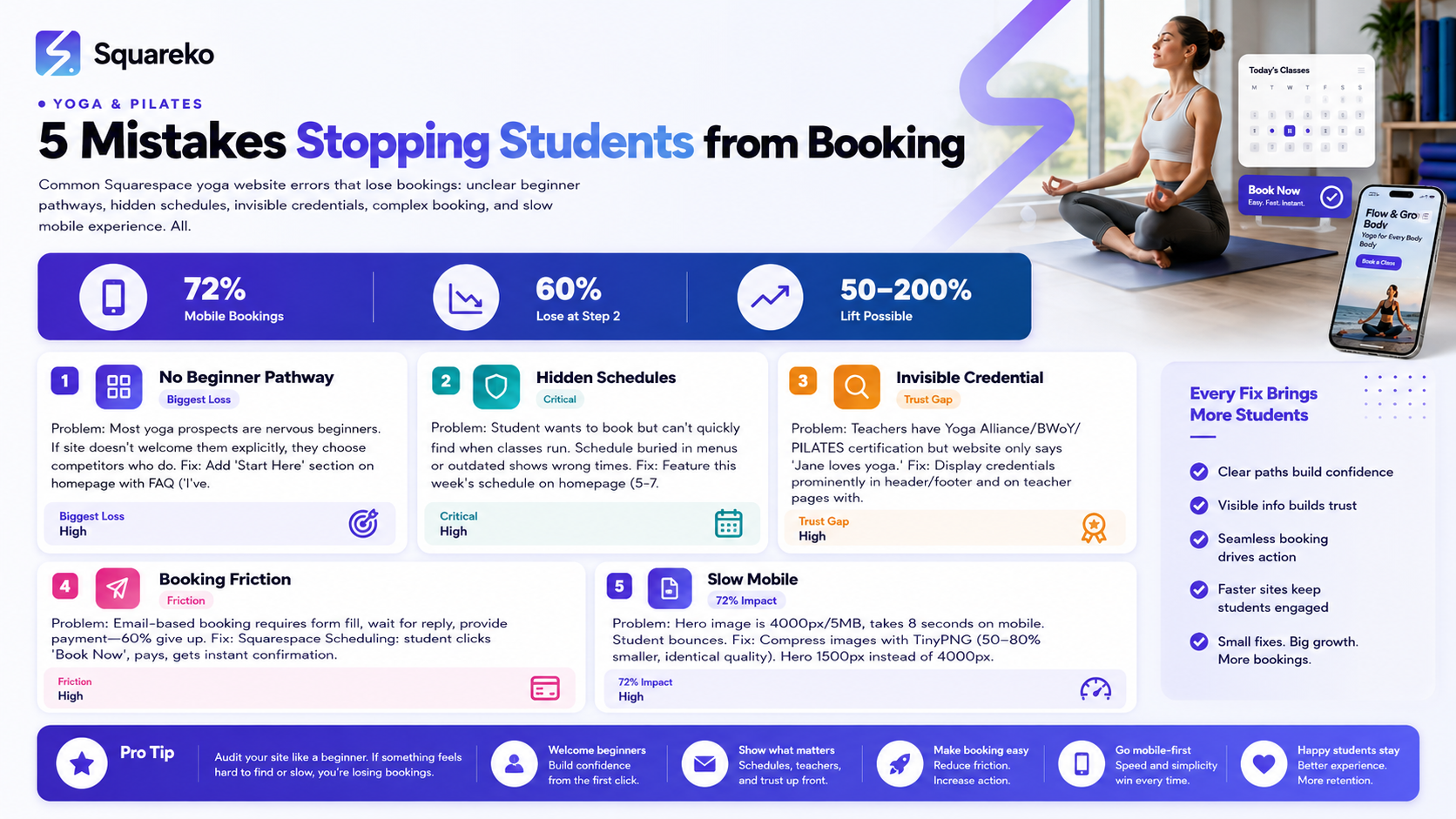
Most yoga website visitors are nervous beginners unsure if they belong—if your site doesn't explicitly welcome them, they'll choose another studio
Class schedules buried or outdated will lose you students. Students want to see when classes run before anything else
Yoga Alliance and British Wheel of Yoga credentials visible in your header or About section immediately differentiate you from unqualified teachers
Booking systems requiring emails and follow-ups lose 60%+ of potential students. Squarespace Scheduling with instant confirmation is non-negotiable
Slow mobile pages lose yoga students. 72% of yoga bookings happen on mobile—uncompressed images and non-optimized layouts are conversion killers
Your yoga or pilates website has one job: turn a curious visitor into a booked student. Most websites fail at this. The barriers aren't complicated—they're avoidable mistakes that cost studios new students every single week. A student arrives at your site ready to book, finds friction, and leaves. This guide covers the five most common Squarespace website mistakes that prevent bookings, and how to fix them quickly.
Mistake 1: No Clear Beginner Pathway
This is the biggest mistake. Most yoga websites assume visitors already practice yoga. But the majority of your potential students are nervous beginners they've never taken a class, they're unsure if they're flexible enough, and they're worried they'll look foolish.
The Problem
A visitor lands on your site. They see "Advanced Vinyasa," "Yin Yoga," "Ashtanga." They don't know which one is for them. They don't see "all levels" or "beginners welcome." So they leave and try the studio down the street, which explicitly says "Perfect for beginners."
The Result
You lose students before they even see your beautiful studio photos or read about your experienced teachers.
The Fix
Create a "Start Here" section visible on your homepage:
Headline: "New to yoga? You're in the right place."
Short paragraph (100 words): Explain that all bodies and experience levels belong at your studio. Mention that most students start exactly where they are.
Beginner-friendly classes: Link to your 2–3 most beginner-focused classes
First class offer: "Your first class is free / £5"
FAQ section:
"I've never done yoga before. Can I come?"
"What if I'm not flexible?"
"What should I wear?"
"What happens in my first class?"
"Do I need special equipment?"
This section signals immediately that beginners are welcomed and expected. It removes the barrier that stops nervous students from booking.
Real Example
Instead of: "Classes: Vinyasa Flow | Hatha | Yin | Ashtanga"
Write: "New to yoga? Start with Hatha or Beginner Vinyasa. Both are paced for newcomers and no experience is needed."
This single change increases beginner bookings measurably.
Mistake 2: Hidden or Outdated Class Schedules
This mistake is shockingly common. A student visits, likes what they see, and wants to know: when do classes run? The answer should take 5 seconds to find. If it takes longer, or if the schedule is buried in a dropdown menu or on a separate page, they'll leave.
The Problem
Visitors land on your homepage and have to hunt for the class schedule. Maybe it's linked in the navigation but not prominent. Maybe the schedule page doesn't load quickly. Maybe the schedule shows classes that don't actually run anymore.
Even worse: the schedule shows old times or last semester's classes. A student books a "Tuesday 6 PM Hot Yoga" class that actually runs Wednesday at 7 PM. Confusion + frustration = they never come back.
The Result
You lose bookings because students can't easily see when you teach. You lose student trust because schedules are out of date.
The Fix
On your homepage:
Add a "This Week's Schedule" section showing 5–7 upcoming classes with times, class names, and teachers
Make the schedule responsive and mobile-friendly
Include a "View Full Schedule" button linking to a detailed schedule page
On a dedicated Classes or Schedule page:
Display the full weekly schedule in a clear, grid format (Mon–Sun, with time slots)
Include class name, teacher, duration, and level (Beginner / All Levels / Intermediate)
Add a direct "Book" button next to each class (not a separate booking form)
Update the schedule weekly or use Squarespace's automated scheduling integration
Integration tip: Use Squarespace Scheduling or a connected booking system (like Mindbody or Maroochy) that auto-populates your website. This prevents manual updates and keeps schedules current.
Update schedule immediately when changes happen (teacher absence, room closure, new class addition). A student showing up to a class that no longer exists is a disaster for your reputation.
Real Example
This week's schedule on homepage:
MONDAY
9:00 AM — Hatha (Beginner) — 60 min — Jane → Book
6:00 PM — Hot Yoga (All Levels) — 75 min — Marcus → Book
TUESDAY
10:00 AM — Yin Yoga (All Levels) — 90 min — Rachel → Book
6:00 PM — Vinyasa Flow (Intermediate) — 60 min — Tom → Book
Each class has a direct booking button. A schedule that looks like this keeps students from leaving.
Mistake 3: Invisible Teacher Credentials
A student considering yoga has done research. They've read about Yoga Alliance certification, British Wheel of Yoga (BWoY) registration, and why credentials matter. If your website doesn't mention credentials or they're buried in a tiny bio, you lose the credibility that sets you apart from unqualified YouTube yoga teachers.
The Problem
You have amazing teachers with Yoga Alliance certification, years of experience, and specialized training. But your website just says "Meet our teachers" with generic photos and vague bios: "Rachel loves yoga and has been teaching for 5 years."
Meanwhile, a competitor's site says: "Rachel Smith Yoga Alliance Certified (1,234,567) — 200-hour YTT, trained under Respected Teacher Specializes in Trauma-Informed Yoga."
The visitor books with the competitor.
The Result
You don't leverage one of your biggest competitive advantages: qualified, credible teachers.
The Fix
In your website header or footer: Display your studio's credentials prominently:
"All teachers Yoga Alliance certified"
"PILATES Foundation registered studio"
"British Wheel of Yoga affiliated"
This appears immediately and signals quality.
On individual teacher pages: Include full credentials:
Yoga Alliance registration number (linked to verification)
Yoga training institution and year completed
Additional certifications (trauma-informed, prenatal, Iyengar, etc.)
Years teaching experience
Teaching lineage (trained under respected teacher)
In class descriptions: Mention the teacher's specialization:
Instead of: "Hatha Yoga with Rachel"
Write: "Hatha Yoga with Rachel (Yoga Alliance Certified, Trauma-Informed Specialization)"
This gives students confidence they're booking with a qualified, specialized teacher.
Real Example
Teacher bio — from this:
"Rachel teaches Hatha yoga and loves helping beginners."
To this:
"Rachel Smith — Yoga Alliance 1234567. 200-hour YTT from School (2015). Specializes in trauma-informed yoga and working with anxiety. Has taught 2,000+ classes over 8 years. Regular students report feeling safer and more grounded in their bodies."
The second version is what builds trust.
Mistake 4: Booking Requires Too Many Steps
A student has decided: they want to book your Tuesday 6 PM hot yoga class. But your booking process requires them to:
Fill out a contact form
Wait for an email reply
Provide payment info
Confirm via email
By step 2, 60% of potential students have given up.
The Problem
Manual booking systems (email, form submission) are friction. They introduce delays, create confusion about payment, and let students forget about you between the initial interest and the confirmation.
The Result
Lower conversion rate. Fewer bookings. More admin work for you because you're managing enquiries, sending confirmations, and chasing payment.
The Fix
Implement Squarespace Scheduling with instant booking and payment:
Each class has a "Book Now" button
Student selects the class, provides basic info (name, email, phone)
Student pays immediately (or opts for pay-on-arrival)
Instant confirmation email with class details
Student is done
Squarespace Scheduling is built-in and free. Setup takes 30 minutes:
Go to Settings > Scheduling
Create a "Class Booking" service (or one per class type)
Add duration, price, availability (link to your class schedule)
Add a calendar or button to your website pages
Enable automated confirmation emails
Optional add-ons:
Require payment upfront for commitment (especially for new students)
Send reminder emails 24 hours before class
Allow students to manage their bookings (cancel, reschedule)
Integration with your email list (auto-add bookers to newsletter)
Instant booking dramatically increases conversion. A student who books immediately is far more likely to attend than a student who "thinks about it" after emailing you.
Real Example
Old process:
Student: "How do I book hot yoga?"
Studio: "Email us and we'll send details"
24 hours later Studio sends confirmation
Student confirms payment
Student maybe shows up
New process:
Student clicks "Book Now"
Student pays (or doesn't)
Student gets instant confirmation
Student shows up
The second process has 3x higher show-up rates.
Mistake 5: Slow Mobile Experience
72% of yoga class bookings happen on mobile phones. A student searching "yoga near me" on their phone, finding your site, and encountering slow load times will leave. Uncompressed images are the biggest culprit.
The Problem
Your hero image is a beautiful 4000px-wide photo of your studio. It's 3 MB. On a mobile connection, it takes 8 seconds to load. The student bounces to the next search result.
Even if the page loads, large images push content down. The student has to scroll past three massive photos just to find the class schedule. On mobile, this feels slow and annoying.
The Result
High bounce rate on mobile. Lower bookings. Potential students never see your schedule or teacher information.
The Fix
Compress all images before upload:
Use TinyPNG (tinypng.com) — free, batch upload available
Upload images, download compressed versions (usually 50–80% smaller)
Quality is visually identical
Or use Squoosh (squoosh.app) for advanced compression
Image sizing:
Hero images: 1500px wide, not 4000px
Teacher photos: 400–600px wide
Class preview images: 300–500px wide
Compress before uploading — don't rely on CSS to shrink them
Mobile optimization:
Test your site on mobile (iPhone and Android) using Squarespace's mobile editor
Ensure text is readable without zooming
Buttons and booking links are tap-friendly (minimum 44px)
No horizontal scrolling
Schedule is readable without side-scrolling
Test page speed:
Go to Google PageSpeed Insights
Enter your URL
Check mobile score (target: 80+)
Fix images and speed issues listed
Use Squarespace's built-in mobile optimization:
Squarespace automatically optimizes images
But compressing before upload gives extra boost
Check Settings > Mobile > Mobile Editor to see how your site looks on phones
Real Example
Hero image optimization:
Before: 4000px x 3000px, 5.2 MB
After (compressed): 1500px x 1125px, 0.8 MB
Load time improvement: 8 seconds → 1.5 seconds on mobile
This single change can increase mobile bookings by 20–30%.
Quick Fixes and Priority Order
Overwhelmed by all five fixes? Here's the priority order:
Week 1 (Do this immediately)
Add a "Start Here for Beginners" section on your homepage with FAQ
Fix your class schedule — make it visible on the homepage and keep it current
Compress hero images using TinyPNG
These three fixes address 70% of the problem and take 3–4 hours total.
Week 2
Display teacher credentials in your header and on teacher profile pages
Test mobile experience and fix any scrolling/readability issues
Week 3
Set up Squarespace Scheduling if you haven't already (removes email friction completely)
This phased approach means your site improves measurably each week without overwhelming your workflow.
Ready to Fix Your Yoga Website and Get More Bookings?
These five mistakes are fixable, and fixing them moves the needle. A yoga studio website that welcomes beginners, displays current schedules, highlights qualified teachers, enables instant booking, and loads fast on mobile converts 2–3x more visitors into students.
At Squareko, we audit yoga and pilates websites specifically for these conversion blockers. We identify what's stopping students from booking, fix the mistakes, and help you implement the best-practice setup for Squarespace.
Frequently Asked Questions
-
Most fixes are free or low-cost. Compressing images is free. Creating a beginner section requires 2–3 hours of your time. Adding teacher credentials is 1–2 hours. Squarespace Scheduling is built-in. The biggest cost is your time — outsourcing to a designer (like Squareko) runs £500–1,500 for a full website audit and fixes.
-
Probably not overnight, but within 2–4 weeks. The beginner section and updated schedule drive immediate improvements. Mobile speed and booking friction reductions build over time as more people visit and convert. You should see measurable improvement within a month.
-
You can fix most of these yourself. Compressing images, adding a beginner section, and updating the schedule are doable. Squarespace Scheduling setup is straightforward (30 minutes). If you're comfortable with copy-writing and basic site editing, you can handle it. A designer helps with visual polish and optimization beyond the basics.
-
Squarespace Scheduling is sufficient for most small studios. It integrates directly with your site, has no additional cost, and handles bookings, payments, and confirmations. If you need advanced features (class capacity management, teacher scheduling, retail sales), Mindbody adds complexity but more functionality. Start with Squarespace Scheduling and upgrade if needed.
-
Update it weekly at minimum. Ideally, your schedule is automated (connected to your booking system), so it's always current. If you update manually, do it every Sunday for the week ahead. If you make last-minute changes (teacher absence, room closure), update within 24 hours.
-
Use Google PageSpeed Insights. Aim for 80+ on mobile (90+ is excellent). Anything below 70 is losing you mobile students. Most yoga websites can hit 85+ with image compression alone.
-
For beginners, offering a free or discounted first class removes risk. For return bookings, requiring payment upfront ensures commitment (higher show-up rate). Squarespace Scheduling allows you to set different payment rules per class type.
-
Feature 2–4 beginner-friendly classes prominently on the homepage. Don't overwhelm with all 15 classes. Give beginners a clear choice (e.g., "Hatha for Beginners" and "Beginner-Friendly Vinyasa") and let them explore the full schedule if interested.
Stop Losing Bookings to Website Mistakes
Your website should be a booking machine, not a friction point. These five mistakes are fixable, and fixing them increases your conversion rate by 50–200%. At Squareko, we specialize in yoga studio websites that convert.

From custom website design to SEO strategy, we help businesses launch a site that looks professional and performs better.

About the Author
Walid is the founder of Squareko,
I'm Walid Hasan, a Certified Squarespace Expert and Squarespace Circle Platinum Partner with over 12 years of hands-on experience designing and optimizing high-performing websites. Over the years, I've had the privilege of building more than 2,000 Squarespace websites for clients around the world, always focusing on clean design, strong user experience, and conversion-driven results.
