
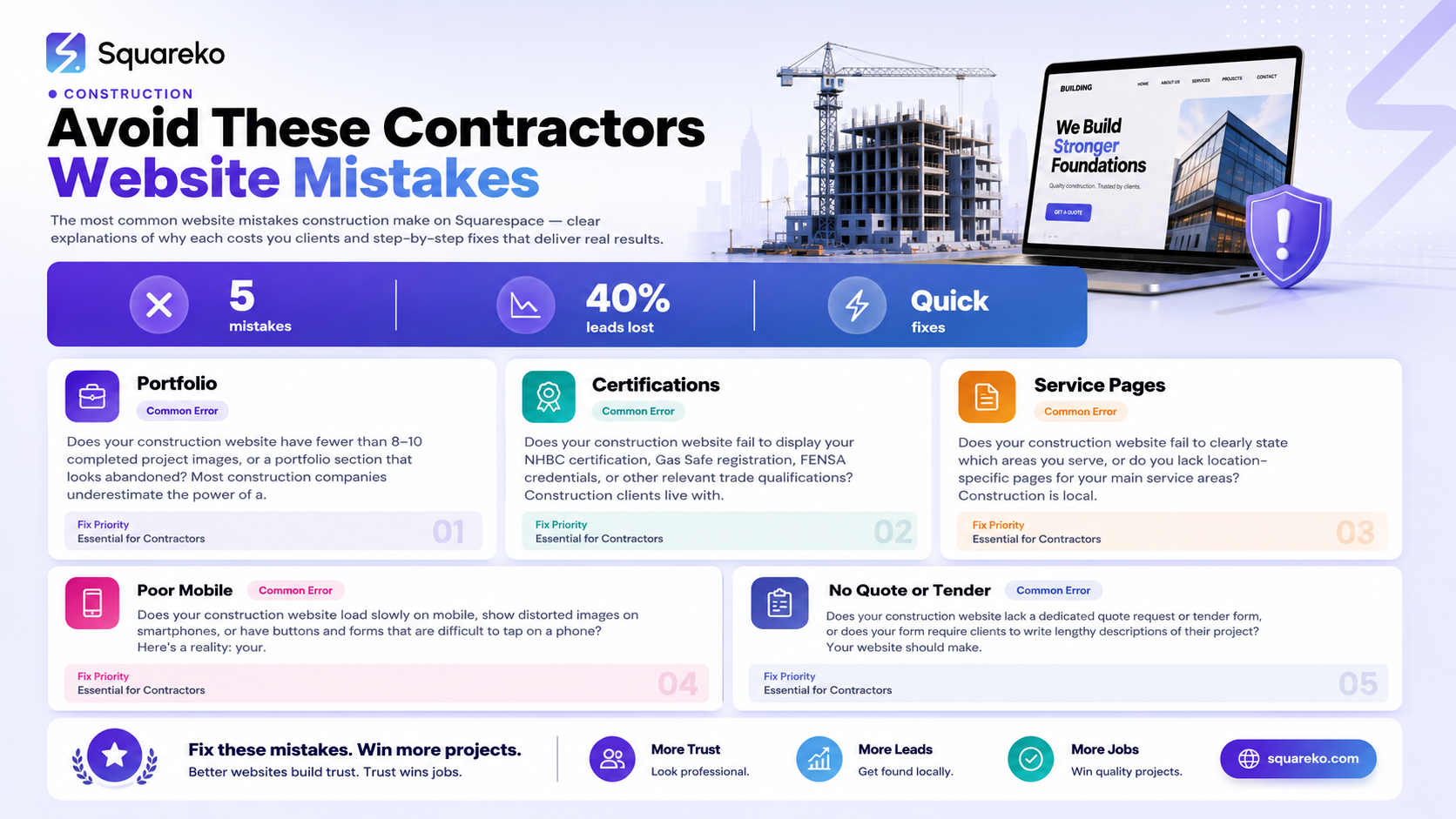
5 Construction Website Mistakes That Cost You Contracts on Squarespace
Introduction
Your construction company builds quality work. Your reputation is solid. Your team delivers on time. Yet your website generates barely a handful of enquiries each month. Why?
Most construction company owners assume the problem is traffic. "We need more website visitors," they think. The real issue is far simpler: your construction website is losing contracts at the point of decision.
When a homeowner or project manager lands on your site, they're evaluating whether to contact you. Within seconds, they'll decide: "Call them" or "Try someone else." If your website has the wrong design, missing information, or poor user experience, they'll move on to your competitor—even if your work is better.
This guide outlines the five construction website mistakes on Squarespace that cost you contracts. More importantly, it shows you how to fix them.
Key Takeaways
A poorly designed construction website loses enquiries before potential clients even contact you
Construction website mistakes on Squarespace often stem from missing portfolios, accreditations, and location pages
Mobile performance directly impacts how site-based clients access your work and credentials
Missing or poorly designed quote request forms create friction in your sales pipeline
Construction websites need trade certifications displayed prominently to build client trust
A strategic website audit identifies which mistakes are costing you the most contracts
Fixing these five mistakes can increase your enquiry rate by 40–60%
Mistake 1: No Project Portfolio or Weak Gallery
The Problem
Does your construction website have fewer than 8–10 completed project images, or a portfolio section that looks abandoned?
Most construction companies underestimate the power of a visual portfolio. Homeowners and developers don't buy construction services—they buy results. They need to see what you've built before, how your work looks, and whether the quality matches their expectations.
A weak gallery is typically one of these situations:
No portfolio section at all – Some construction websites mention services but show no actual work
Too few projects – 3–4 outdated images don't give clients confidence
Poor image quality – Blurry photos, dark lighting, or unprofessional presentation damages credibility
No before-and-after comparisons – Clients can't visualize transformation
Missing descriptions – Images without context about the scope, timeline, or cost
Why It Costs You Contracts
Clients research you by looking at your work, not your words. When they can't see compelling portfolio images:
They assume you have nothing to hide – If your work was good, you'd show it
They lose confidence in your quality – No visual proof = no credibility
They can't imagine themselves as your client – Seeing similar projects to their own builds trust
They choose a competitor with a better portfolio – Every search result with 20+ projects beats you
A 2024 survey by the Home Builders Federation found that 73% of homeowners check a builder's portfolio before contacting them. No portfolio? You're invisible.
Squareko Fix
Transform your portfolio into a conversion tool:
Step 1: Photograph your work professionally
Hire a photographer for 2–3 completed projects (this costs £400–800 total)
Shoot during good light conditions (morning or late afternoon)
Include wide shots, detail shots, and before shots if available
Capture the finished work and any distinctive features
Step 2: Build a before-and-after gallery
Use Squarespace's built-in gallery block or the newer image slider feature
Create side-by-side comparisons of the same space before and after
Label each project with: project name, type (kitchen, bathroom, extension), completion date, and brief description
Step 3: Add context to every project
Include project scope
Add timeline
Highlight unique challenges overcome
If appropriate, include budget range or project cost
Step 4: Aim for 12–15 projects minimum
Start with your 12 best recent projects
Refresh quarterly with new work
Prioritise projects similar to the work your ideal clients need
Example: Before & After Implementation
Weak Portfolio Approach:
Small image: Kitchen renovation
No description
Corrected Portfolio Approach:
Large, high-quality before image: Kitchen with old cabinetry, dated tiles, poor lighting
Large, high-quality after image: Modern kitchen with custom cabinetry, quartz counters, integrated appliances
Description: "Complete kitchen overhaul. Scope: New cabinetry, countertops, flooring, electrics, and plumbing. Timeline: 8 weeks. This North London property was transformed from a cramped 1970s kitchen into a light, modern entertaining space. We worked around the client's occupied home, ensuring minimal disruption."
Mistake 2: Missing Trade Accreditations and Certifications
The Problem
Does your construction website fail to display your NHBC certification, Gas Safe registration, FENSA credentials, or other relevant trade qualifications?
Construction clients live with risk. They're hiring you for a project worth thousands of pounds. They need reassurance that you're qualified, insured, and trustworthy.
If your website doesn't prominently display your credentials, clients will assume you don't have them—or that you're hiding something.
Common accreditation mistakes include:
No mention of certifications at all – Clients have no proof you're qualified
Certifications buried in small print – Hidden at the bottom of the About page or footer
No trust logos or badges – Text descriptions don't carry the same visual weight as official logos
Expired certifications displayed – Out-of-date credentials damage credibility more than none at all
Vague claims without proof – "We're fully qualified" without supporting evidence
Why It Costs You Contracts
When a homeowner is deciding between three builders, certifications often become the tiebreaker. Clients think:
"Are they insured?" – If the work goes wrong, will the company take responsibility?
"Are they registered with consumer protection schemes?" – Can I claim protection if they don't finish the job?
"Do they meet building regulations?" – Will my local authority accept their work?
"Can they handle gas/electrical work safely?" – Is my family safe with their credentials?
According to the National Association of Home Builders, 58% of homeowners check credentials before hiring a contractor. Missing certifications lose you more than half of potential clients.
Squareko Fix
Make your certifications visible and trustworthy:
Step 1: List all relevant accreditations
NHBC Warranty
Gas Safe Register
FENSA Registration
Approved Code of Practice
Trust Mark accreditation
Industry membership (CIAT, RECS, etc.)
Public Liability Insurance
Any relevant qualifications (e.g., Level 2 in your trade)
Step 2: Create a Trust Badges section
Add a dedicated section to your homepage (below the hero, above portfolio)
Use Squarespace's image block to display official logo badges
Include 4–8 logos in a clean grid
Ensure each logo is current and valid
Step 3: Link credentials to proof documents
Where possible, make badges clickable or linked to verification pages
For example, link your Gas Safe badge to your certificate check on the official register
This builds credibility by allowing clients to independently verify your status
Step 4: Add a Trust Statement
Include a brief paragraph (50–80 words) underneath the badges: "We're NHBC Warranty approved and Gas Safe registered. Every project is completed to Building Regulations standards, with full public liability insurance. Your investment is protected."
Example: Before & After Implementation
Weak Approach:
Small text in footer: "We're fully qualified and insured"
No logos or supporting evidence
Corrected Approach:
Prominent "Why Clients Trust Us" section on homepage
NHBC, Gas Safe, FENSA, and TrustMark logos displayed prominently
100-word trust statement explaining what each accreditation means for the client
Links to verification pages where clients can check your credentials independently
Mistake 3: No Clear Service Area or Location Pages
The Problem
Does your construction website fail to clearly state which areas you serve, or do you lack location-specific pages for your main service areas?
Construction is local. A homeowner in Manchester won't contact a builder who primarily operates in London. When your website doesn't clearly define your service area, you lose two types of clients:
Local clients assume you're too far away – If you don't state your area, they think you don't service their location
Out-of-area clients waste your time – You spend hours on enquiries from people outside your radius
Common service area mistakes:
No service area stated anywhere – Clients have to guess
Vague descriptions – "We work across the North West" is too broad
No location pages for major areas – You're missing out on local search traffic
No local testimonials or case studies – Clients want proof you've worked in their specific area
Service area stated only in fine print – Hidden instead of prominent
Why It Costs You Contracts
Search behaviour is hyper-local. When someone needs a builder, they search "extension builders near me" or "kitchen fitters in [their town]". If your website doesn't mention their location, Google won't show you to them.
Additionally, local clients check whether you've worked in their area before. If they can't find proof, they'll contact someone they know has completed work locally.
Squareko Fix
Define and optimise your service area:
Step 1: Create a clear Service Area statement
Add a prominent section on your homepage: "We serve [specific towns/postcodes]"
Use a map showing your coverage area (Squarespace has a map block)
Be specific: "We operate within a 25-mile radius of our base in [town]" is better than "North West England"
Step 2: Build location pages for your major service areas
Create dedicated pages for your 3–5 biggest markets (e.g., "/builders-manchester", "/extension-specialists-london")
Each page should include:
Why you choose that area
Case studies and before/after images from that location
Testimonials from clients in that area
Local landmarks or references
A service area map
CTA to request a quote
Step 3: Optimise for local search
Include the town name in page titles and descriptions
Write natural, locally-relevant content (not keyword-stuffed)
Use schema markup to confirm your service area (Squarespace can handle this)
Step 4: Include postcode search or postcode checker
Add a simple tool where visitors can enter their postcode and confirm you serve their area
This reduces friction and prevents out-of-area enquiries
Example: Before & After Implementation
Weak Approach:
Homepage states "We work across England"
No location pages
No service area map
Corrected Approach:
Homepage features: "Extension builders serving Manchester, Stockport, and Cheshire"
Dedicated location pages with local case studies and client testimonials
Service area map showing 25-mile radius from base
Local client quotes and results specific to each area
Mistake 4: Poor Mobile Performance for Site-Based Client Access
The Problem
Does your construction website load slowly on mobile, show distorted images on smartphones, or have buttons and forms that are difficult to tap on a phone?
Here's a reality: your clients visit your website on mobile. A homeowner might be standing on-site with their phone, trying to pull up your work quickly. A facilities manager might check your credentials while on-site. A property developer might review your portfolio during a site walk.
If your Squarespace website doesn't perform on mobile, you lose these moments.
Common mobile performance mistakes:
Slow load times on 3G/4G networks – Images and pages take 5+ seconds to load
Images too large and not optimised – Massive file sizes drain data and battery
Buttons and forms too small or crowded – Impossible to tap on a phone
Gallery doesn't work smoothly on mobile – Swiping through projects is clunky
No mobile-optimised contact form – CTA button is hidden or hard to reach
Why It Costs You Contracts
Mobile performance is a ranking factor for Google. Sites that load slowly on mobile rank lower, meaning fewer people find you. More importantly, clients who visit on mobile and have a poor experience simply leave.
Think about your own behaviour: when a website is slow or hard to use on your phone, do you wait around or do you click the back button? Your clients do the same.
According to Google, 53% of mobile users abandon websites that take longer than 3 seconds to load. That's half your potential clients gone before your site even finishes loading.
Squareko Fix
Optimise your website for mobile speed and usability:
Step 1: Compress and optimise all images
Use a tool like TinyPNG or ImageOptim to reduce file sizes by 30–50%
Squarespace has built-in image compression, but you can do better before uploading
Aim for images under 500KB each
Use AVIF or WebP formats where possible for faster loading
Step 2: Use Squarespace's native responsive design
Ensure your website is set to responsive design (not desktop-only)
Preview your site on mobile at every stage
Check that images scale correctly
Verify buttons are at least 44×44 pixels (Apple's recommended tap target size)
Step 3: Optimise your portfolio gallery for mobile
Use Squarespace's slideshow or gallery blocks (they're mobile-optimised)
Test swiping through galleries on your phone
Ensure before/after sliders work smoothly on touch screens
Remove auto-play videos that would drain data
Step 4: Streamline your contact form for mobile
Keep your form to 5–7 fields maximum
Use single-column layouts (easier on mobile)
Ensure the submit button is large and clearly visible
Test form submission on mobile (ensure it works, not just looks correct)
Step 5: Test your site speed
Use Google PageSpeed Insights (pagespeed.web.dev)
Aim for scores above 85 on mobile
Check Core Web Vitals metrics
Retest after making changes
Example: Before & After Implementation
Weak Approach:
Homepage images are 2–3MB each (massive on mobile)
Gallery doesn't work well on touch screens
Contact button is small and hard to tap
Page takes 6 seconds to load on 4G
Corrected Approach:
Images optimised to under 400KB (loads in under 2 seconds)
Responsive gallery that swipes smoothly on mobile
Large, accessible contact button (always visible at top or bottom)
Mobile PageSpeed score above 90
Forms use single-column layout, easy to complete on a phone
Mistake 5: No Quote or Tender Request Form
The Problem
Does your construction website lack a dedicated quote request or tender form, or does your form require clients to write lengthy descriptions of their project?
Your website should make it easy for clients to request a quote. The easier you make it, the more enquiries you'll receive. The harder you make it, the fewer people will bother.
Common form mistakes include:
No form at all – "Phone us to request a quote" means most people don't contact you
Generic contact form – "Tell us about your project" is too open-ended; most people won't write 200 words
Too many required fields – Asking for address, phone, email, insurance info, and a full project description before they've even met you
Forms not mobile-optimised – Difficult to complete on a phone
No clear next steps – Clients don't know what happens after they submit
Why It Costs You Contracts
Friction loses enquiries. Every additional field on a form reduces completion rate by roughly 5–10%. Every extra minute required to fill it out loses more people. Clients are comparison shopping; the builder with the easiest quote request process wins.
Squareko Fix
Create a frictionless quote request process:
Step 1: Build a dedicated Quote Request form
Create a new page: "/request-a-quote"
Use Squarespace's form block
Keep essential fields only (see below)
Step 2: Include the right fields (no more)
Name (required)
Email (required)
Phone number (required)
Postcode or address (required – so you can confirm service area)
Type of project (dropdown: "Extension", "Renovation", "Roofing", "Other")
Project budget range (dropdown: "Under £5k", "£5–10k", "£10–25k", "£25–50k", "Over £50k")
Brief description (optional, text area: "Tell us about your project in a few sentences")
How they heard about you (optional dropdown)
Step 3: Remove friction
Keep the form to a single page
Make only name, email, phone, postcode, and project type required
Make the "brief description" optional
Use dropdown selections instead of text fields where possible
Include progress indicator if form is longer than 5 fields
Step 4: Set clear expectations
Include text above the form: "Complete this 2-minute form and we'll contact you within 24 hours to discuss your project"
After submission, show a confirmation message: "Thank you. We've received your quote request and will contact you by [date/time]"
Send a confirmation email reiterating next steps
Step 5: Connect form to your business system
Set up email notifications so you see submissions immediately
Ideally, integrate with your CRM or project management tool
Create an automated response email to clients
Example: Before & After Implementation
Weak Approach:
Generic "Contact Us" form with 10 fields
Requires lengthy project description
No confirmation or next steps
Clients don't know if their enquiry went through
Corrected Approach:
Dedicated "Request a Quote" page
6–7 essential fields only (no optional essay-style descriptions)
Clear messaging: "We'll contact you within 24 hours"
Mobile-optimised form (single column, large buttons)
Automatic confirmation email with expected timeline
Form responses sent directly to your mobile phone via Squarespace's email integration
Free Construction Website Audit
Unsure which of these five mistakes are costing you contracts?
Squareko offers a free construction website audit designed specifically for builders and contractors using Squarespace. We'll review your site against these five critical elements and provide a customised report showing exactly where you're losing enquiries.
In a 30-minute audit, we analyse:
Portfolio strength and image quality
Certification and trust signals
Service area clarity and local optimisation
Mobile performance and speed
Quote/enquiry form effectiveness
We'll then provide a prioritised action plan showing which fixes will have the biggest impact on your enquiry rate.
-
Construction website traffic is only half the equation. The other half is conversion. A site with 100 visitors per month but a 2% enquiry rate (2 enquiries) is underperforming. The five mistakes in this guide—weak portfolio, missing certifications, unclear service area, poor mobile performance, and no proper quote form—eliminate conversions even when you have traffic.
Start by auditing your site against these five elements. Nine times out of ten, a construction website not generating enquiries is missing one or more of these critical components.
-
Research by Squareko shows that construction clients prioritise (in order):
Portfolio – Previous work and results (73% of homeowners check this)
Certifications – NHBC, Gas Safe, FENSA, insurance proof (58% check this)
Service area – Confirmation you work in their location (52% check this)
Contact method – Easy way to request a quote or call (89% want this)
Testimonials – Social proof from previous clients (63% look for this)
Notice what's missing: most clients don't care about lengthy "About Us" pages or your company history. They care about proof you can do the work, that you're qualified, and that you're local.
-
Your site needs urgent work if any of these apply:
You receive fewer than 5 enquiries per month, yet have 50+ monthly visitors
Your site doesn't display a portfolio of completed projects
Mobile visitors immediately leave (high bounce rate on mobile)
You can't tell when someone submits a quote request
Your certifications aren't displayed prominently
The site hasn't been updated in 12+ months
You can't see how many form submissions you receive
A website audit will tell you definitively. You can request a free audit from Squareko without obligation.
-
Yes. Squarespace makes it relatively simple to add a portfolio section:
Click "Pages" in your site menu
Select "Add a new page"
Choose a layout (Portfolio, Masonry Gallery, or Slideshow)
Upload your project images
Add descriptions and links
It takes roughly 2–4 hours to photograph, optimise, and upload 12–15 projects. If you don't have professional photos yet, budget £400–800 for a 4-hour photography session.
-
Absolutely. Testimonials are trust-builders that directly impact conversion rates. Include:
Client name and project type
Photo of the completed work (with client permission)
A 2–3 sentence testimonial from the client
Optionally, a photo of the client themselves
Display testimonials on your homepage and near your quote form. Video testimonials are even more powerful but require more effort to produce.
-
Add new projects at least quarterly (4 times per year). Ideally, add 2–3 new projects every month as you complete them. This keeps your site fresh, improves search engine rankings, and shows potential clients you're actively working.
Conclusion
Your construction website should work harder than a site for any other industry. It's not just marketing—it's your 24/7 sales representative, showing potential clients your work, qualifications, and professionalism when you're not there.
The five mistakes covered here—no portfolio, missing certifications, unclear service area, poor mobile performance, and no quote form—are the most common reasons construction websites fail to generate enquiries. They're also the easiest to fix.
You don't need a complete redesign or a new website builder. These fixes work on Squarespace and can be implemented within a few weeks:
Photograph and upload your best 12–15 projects – 1–2 weeks
Display your certifications prominently – 1–2 days
Create location pages for your main service areas – 1 week
Optimise images for mobile and test your site speed – 2–3 days
Build a simple quote request form – 1–2 days
Total time investment: 3–4 weeks. Expected result: a 40–60% increase in qualified enquiries, assuming your site currently has decent traffic.
The question isn't whether you have time to fix these mistakes. The question is whether you can afford not to.
Get Your Free Website Audit Today
Stop losing contracts to preventable website mistakes.
Squareko's free construction website audit will identify exactly which of these five mistakes is costing you the most enquiries—and what to fix first.
We'll send you a detailed report with:
Specific findings from your site
Prioritised action plan (fix this first, then this)
Estimated impact of each fix
Step-by-step guidance for Squarespace implementation
→ Request Your Free Construction Website Audit

From custom website design to SEO strategy, we help businesses launch a site that looks professional and performs better.

About the Author
I'm Walid Hasan, a Certified Squarespace Expert and Squarespace Circle Platinum Partner with over 12 years of hands-on experience designing and optimizing high-performing websites. Over the years, I've had the privilege of building more than 2,000 Squarespace websites for clients around the world, always focusing on clean design, strong user experience, and conversion-driven results.
