Squarespace Template for an Online Coaching Business
The short answer: the template is the last decision, not the first. An online coaching business is decided by how you take the money — one-off programme, cohort, subscription, or gated library — because each of those maps to a different Squarespace object with different fees and different limits. Get that wrong and no template rescues it. Of Squareko's range, Luminary is the only template shipping Courses pages alongside a Shop, and it ships no Contact page, which you build on day one.
This post is about the machinery. The coaching site itself — positioning, proof, the booking page — is covered in Squarespace templates for coaches.
Five decisions, in the order they have to be made
Work down this list before you look at a single template. Each row changes the site map.
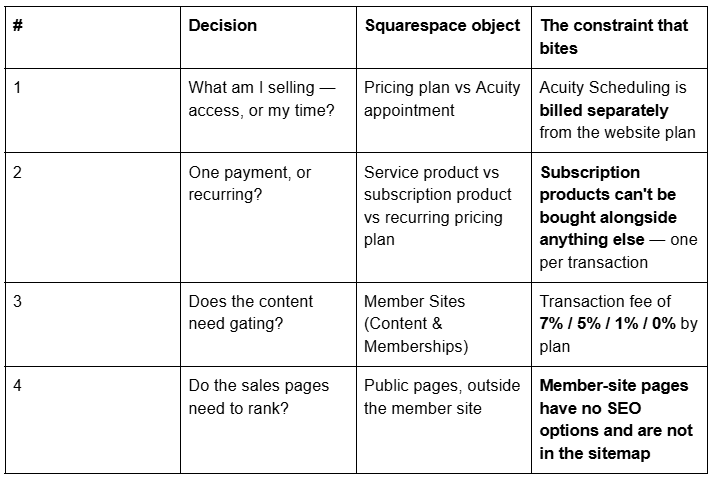
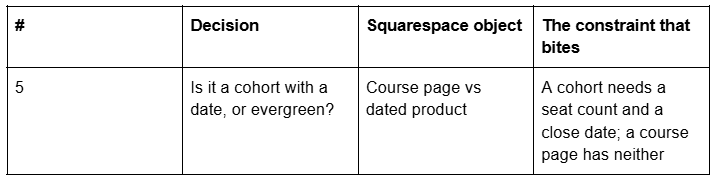
Decisions 3 and 4 together are the one that catches people. Everything behind the paywall is invisible to search, so the pages that sell the programme have to live outside it.
Decision 1 — Selling access is not the same as selling your time
An online coaching business almost always sells both, and they run on different systems in Squarespace 7.1.
Selling your time — discovery calls, one-to-one sessions, group calls — runs on Acuity Scheduling. Squarespace's own Help Center states that Squarespace Scheduling is now officially Acuity Scheduling, and it is billed separately from your website plan. No template ships booking; a template ships a page where the Acuity embed goes. Acuity's calendar allowance is tiered at 1, 6 and 36 calendars, which matters if you run more than one programme in parallel.
Selling access — a programme, a course, a members' library — runs on Member Sites, formerly Member Areas, now grouped under Content & Memberships. Access is granted by a pricing plan attached to a member site, not by a product in your store.
That distinction is the single most common architectural mistake in coaching builds. A store product takes money. A pricing plan takes money and grants access. They are separate objects, and buying one does not trigger the other.
Decision 2 — The subscription trap
If your programme bills monthly, read this before you build anything.
Squarespace subscription products are store products that renew. Their documented limits are narrow, and every one of them affects a coaching business:
"You must sell physical or service products. You can't create subscription download products."
"Customers can only purchase one subscription product at a time and can't include other types of products in the transaction."
Subscriptions can only be paid for with Squarespace Payments or Stripe — not PayPal, Apple Pay or ACH.
Renewal frequency runs from weekly to twelve-monthly, and changing it means discontinuing the product and creating a new one.
Quantity limits and stock levels are not available for subscription products.
The second bullet is the one that costs money. A coaching business that wants to sell "monthly membership plus a one-off intensive" in a single checkout cannot — the customer buys twice.
And a store subscription product does not grant member-site access. Recurring membership access is sold through a recurring pricing plan on the member site, which is a different object entirely. Squarespace's guidance has been that subscription products do not work with Member Areas; treat the two systems as separate and confirm current behaviour before you architect around either.
Decision 3 — What gating actually costs
Member Sites is not a flat paid add-on. It is included on paid website plans and monetised through a Digital Content and Memberships transaction fee that falls as your plan rises:
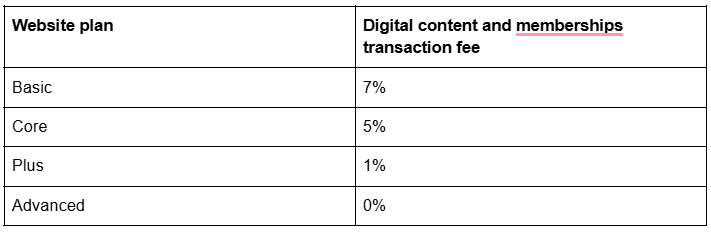
Those are Squarespace's published figures for current plans. Confirm the live rate before you price a programme against it — fees and tier names change, and this is the number that decides whether a £2,000 cohort costs you £140 or nothing.
Two related facts. Payment processing fees are on top of the transaction fee, so the total take is higher than the table. And the standalone Digital Products plan is closed to new signups: Squarespace's wording is "As of July 23, 2026, you can't sign up for a Digital Products plan." It survives only for customers on legacy Personal, Business or Commerce plans who subscribed before that date. If a 2024 guide tells you to buy a Digital Products plan, it is out of date.
Run the arithmetic at your actual price point. On Basic, a coaching business turning over £60,000 a year in gated content pays roughly £4,200 in transaction fees alone — which usually makes upgrading the website plan the cheaper decision.
Decision 4 — Everything behind the paywall is invisible to search
This is the structural fact that decides your site map, and almost no coaching template guide mentions it.
Squarespace states it plainly: "Pages in a member site don't have SEO options and aren't indexed in your site map." It goes further — "When a page is in a member site, the page's SEO options and passwords are deactivated, and its URL is removed from your site map."
So an online coaching business needs two site maps in one site:
Outside the paywall — everything that has to be found and everything that has to sell. The programme sales page, the pricing page, the About page, the blog, the free lesson, the FAQs page. Squarespace 7.1's native Accordion block renders server-side, so FAQ text on a public sales page is crawlable; use it.
Inside the member site — the delivery. Course pages, lesson videos, worksheets, the community. None of it earns you a single visitor, and none of it should be expected to.
The practical rule: never put a sales page inside the member site. Put the paywall between the sales page and the content, not in front of the sales page. If you have a free lesson worth ranking for, it belongs on a public page with the upgrade link at the bottom, not as a "free" tier inside the gate.
Decision 5 — Cohorts have a date; course pages do not
A Course page in Squarespace holds chapters and lessons, tracks progress with a progress bar, and caps at 250 lessons per course page. Videos in a lesson's Video tab can run up to three hours, storage allowing — and every Squarespace site includes only 30 minutes of video storage by default, which is the second cost most coaching businesses miss.
What a course page does not have is a date or a seat count. It is an evergreen container. A cohort — twelve people, starting 6 January, doors close on the 20th — needs both, and they come from elsewhere:
Seats come from selling the place as a service product with a stock level, so the listing sells out at twelve.
The close date comes from a Scheduled product visibility state or a dated discount, because products have no draft state — only Public, Hidden and Scheduled.
Access is granted afterwards by adding the buyer to the member site, or by the pricing plan they buy.
If you run cohorts on fixed dates, the mechanics overlap heavily with running a dated, capacity-limited event, and the seat, waitlist and archive problems are worked through in Squarespace template for workshops.
The checkout, and the four settings that lose sales
Once the objects are right, the checkout is where a coaching business quietly leaks revenue. Four things to set before launch.
Customer accounts. Member sites require the buyer to have a Squarespace customer account — that is how members access what they bought. Enable and test account creation before the first sale, not after a buyer emails you asking where their programme went.
One subscription per transaction. Covered above, and worth designing around: if you want an order bump, it has to be a separate one-off product on a non-subscription checkout.
Discounts, for early-bird and launch pricing. Squarespace discounts can be limited by date window and scoped to a single product or a category. That is how early-bird pricing runs — not by editing the price, which leaves no record and no urgency.
The post-purchase page. Squarespace's default order confirmation is not an onboarding experience. Point buyers at a real "start here" page and treat it as part of the product.
The email sequence is the part the template cannot ship
No template ships a nurture sequence, and it is the highest-leverage thing an online coaching business builds.
Squarespace Email Campaigns is a separate subscription from the website plan. What matters structurally is that the list has to be fed from somewhere on the public site, which is why the Freebie page in several Squareko templates is worth more than it looks: a built page plus a form is a working lead magnet on day one.
Three sequences do most of the work, and none of them needs a template feature:
Lead magnet → nurture. Whatever the Freebie page gives away, followed by four or five emails that make the programme's argument.
Cart open → close. The dated sequence around a cohort, timed to the close date you set on the product.
Onboarding. What happens in the first week after purchase — the sequence that decides whether the programme gets completed, which decides whether you get the testimonial.
Which Squareko template fits an online coaching business
Three candidates, and the honest trade-off in each.
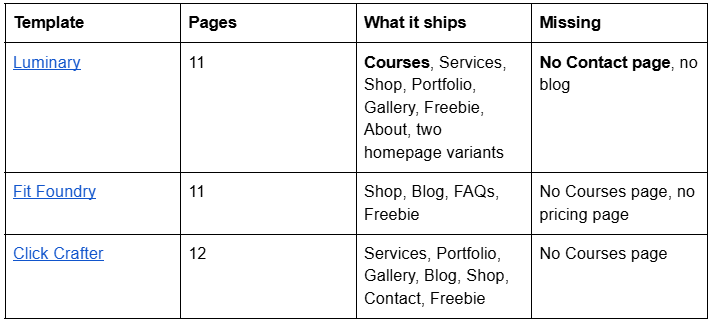
Luminary is the closest structural fit and the only one with Courses pages, verified on its live demo. Two things to know before buying it: it ships no Contact page — confirmed live, not a documentation gap — and it ships no blog. For a coaching business that runs on enquiries and on content, those are two pages you add in the first hour. Squareko also does not publish whether Luminary's Courses pages are wired to Member Sites, so treat them as a layout for a course rather than a configured membership system; the pricing plan and the paywall are yours to set up.
Click Crafter is the better buy if the coaching business still earns most of its money from one-to-one work and the programme is an experiment. It ships the Contact page and the blog Luminary does not, and the Shop takes programme payments perfectly well without a Courses page in front of it.
Fit Foundry suits a coach selling packages rather than curriculum — FAQs plus a Shop, no course structure to fill.
All three are $249, Squarespace 7.1 with Fluid Engine, delivered as a Squarespace contributor invitation rather than a file download.
Build in this order: decide how the money arrives, then price the transaction fee into the programme, then draw the public/private line through your site map, and only then choose the template. A coaching business that gets those three right will succeed on a free Squarespace template; one that gets them wrong will fail on any of them.
Where a second opinion earns its cost is the migration case — an established coaching business moving a programme onto Squarespace with existing URLs and existing members — because Squarespace creates no automatic 301 when a URL changes, ever, and moving a page into a member site removes it from your sitemap on the same day. That is why the premium Squarespace templates in our shop are listed with their full page structure rather than a homepage screenshot. Most coaches reading this will build it themselves from the five decisions above.
FAQ
-
Yes, with two separate purchases alongside the website plan. Booking runs on Acuity Scheduling, billed separately, and email nurture runs on Squarespace Email Campaigns, also billed separately. Gated content runs on Member Sites, which is included on paid plans but carries a digital content and memberships transaction fee.
-
A Digital Content and Memberships transaction fee on top of payment processing, published at 7% on Basic, 5% on Core, 1% on Plus and 0% on Advanced. Confirm the current rate on Squarespace's pricing page before pricing a programme, as tiers and percentages change.
-
No. Squarespace states that pages in a member site have no SEO options and are not indexed in your site map, and that moving a page into a member site removes its URL from the sitemap. Keep every sales page, the blog and any free content outside the paywall.
-
Yes, but with limits. Subscription products must be physical or service products, customers can buy only one subscription per transaction and cannot add other items, and payment is restricted to Squarespace Payments or Stripe. Recurring access to gated content is sold through a recurring pricing plan on the member site instead.
-
It closed to new customers. Squarespace's wording is that as of 23 July 2026 you can't sign up for a Digital Products plan; it remains only for customers on legacy Personal, Business or Commerce plans who subscribed before that date. Current plans include digital content selling with a transaction fee instead.
-
In Squareko's range, Luminary is the only template shipping Courses pages, across 11 pages that also include Services, Shop, Portfolio, Gallery and a Freebie page. It ships no Contact page and no blog, both of which a coaching business needs and has to add.

Author Bio
I'm Walid Hasan, a Certified Squarespace Expert and Squarespace Circle Platinum Partner with over 12 years of hands-on experience designing and optimizing high-performing websites. Over the years, I've had the privilege of building more than 2,000 Squarespace websites for clients around the world, always focusing on clean design, strong user experience, and conversion-driven results.