Squarespace Template for a Mental Health Practice: The Multi-Clinician Build
The short answer: With more than one clinician the site stops being a profile and becomes a routing system. Its job is to get an inquiry to the right practitioner with the right availability, quickly, without a coordinator reading every email. So choose the Squarespace template on whether it ships a clinician roster and a repeatable per-clinician detail page — everything else is copied. In the Squareko range is WeDecorefy, the only template with a Team page.
This post covers what changes with multiple clinicians. The business mechanics underneath — fees, insurance, cancellation policy, scheduling settings, telehealth, licensure display — are in the private practice post, and a group practice needs all of them too.
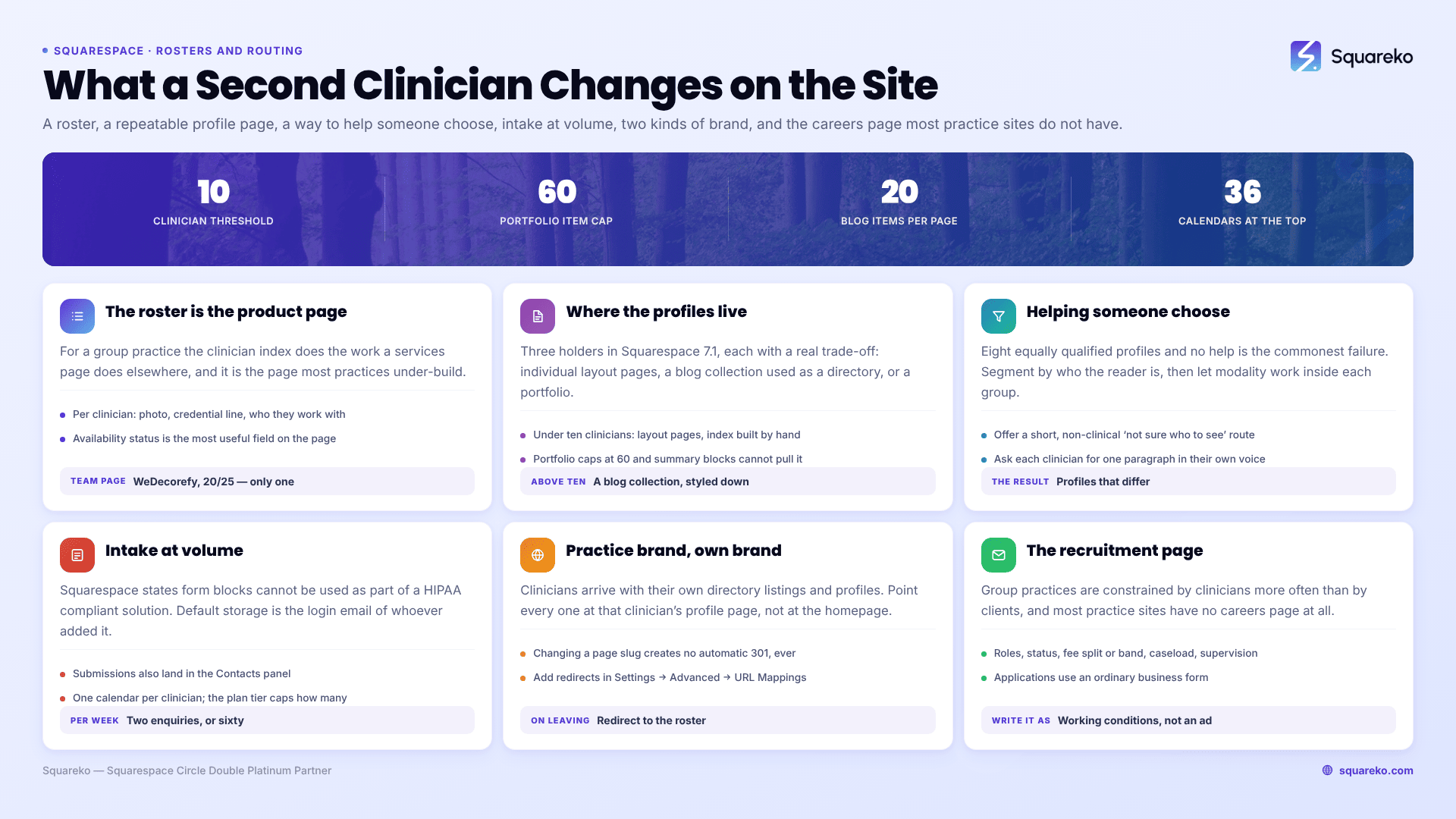
The roster is the product page
For a group practice, the clinician index does the work a services page does elsewhere. It is where a prospective client makes the decision, and it is the page most group practices under-build.
What a roster page needs, per clinician:
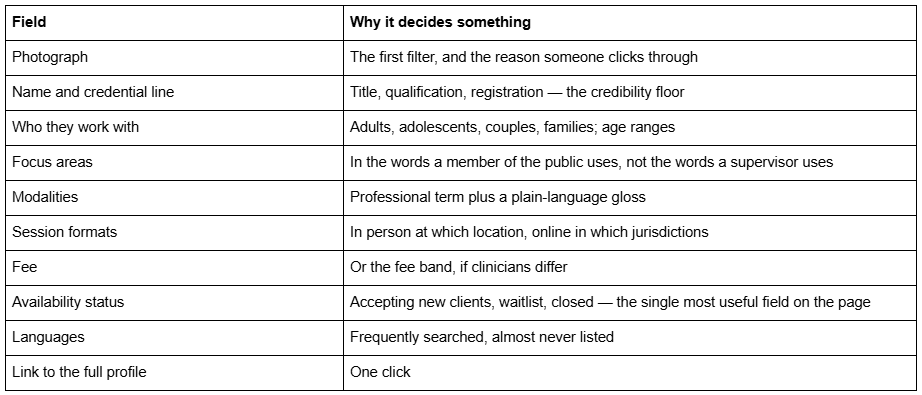
Availability status is the field that changes the enquiry mix. A roster where three of eight clinicians are marked "not currently accepting new clients" produces fewer enquiries and far more bookable ones. It also removes the worst experience a group practice site can create, which is an enquiry, a wait, and then a no.
Keep it maintainable. A roster nobody updates is worse than no roster, so deciding who owns it and how often it is reviewed before you build it — monthly is usually enough.
Per-clinician pages, and how to build them in Squarespace 7.1
Every clinician needs a page, not a card. It is the page that converts, it is the page their name ranks for, and it is what they will link to from directories and their own professional profiles.
Three ways to hold them in Squarespace 7.1, with real trade-offs:
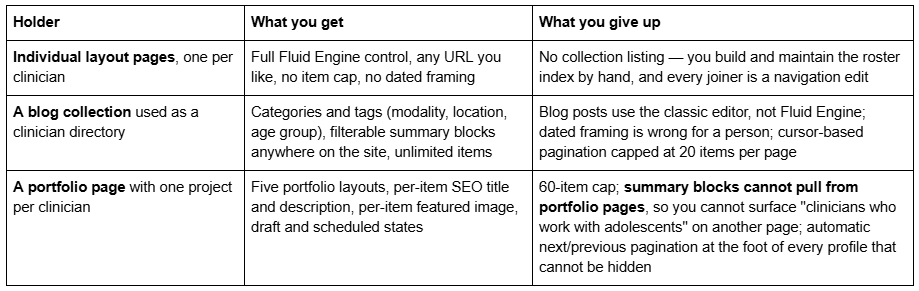
The pragmatic answer for most practices under ten clinicians: individual layout pages, with the roster index built by hand. The maintenance cost is one page edit per joiner, and you get full design control plus clean URLs like /team/sarah-mitchell.
Above ten clinicians, or if you want filtered lists on other pages, use a blog collection and style it so it does not read as a blog: hide dates, hide author bylines, and use categories for modality, location and age group. That is the only route that lets a "counsellors who work with adolescents in Bristol" block exist on a service page, because summary blocks in Squarespace 7.1 pull from blog, events, products and videos pages only — not from portfolios or galleries.
WeDecorefy gives you both halves of the layout-page approach ready-built: a Team page as the roster and a Project Details page you duplicate once per clinician, so every profile has the same rhythm rather than being invented eight times. That is the reason it scores 20/25 in the cluster comparison despite being tagged for interior design.
Helping a client pick the right clinician
The commonest failure in a group practice site is presenting eight equally qualified people and leaving the choice entirely to the reader. Faced with eight, most people pick none.
Three things reduce that:
Segment the roster by something the reader already knows about themselves. Not by modality — by who they are and what they need. Adults / couples / young people. In person / online. Then let modality do its work inside each group.
Offer a "not sure who to see" route. A short, explicitly non-clinical enquiry that asks who the therapy is for, what format suits, rough availability and any preference, then routes to a coordinator. This one page usually carries a large share of a group practice's bookings.
Write the profiles to be distinguishable. Eight profiles written from the same template with the same adjectives are as unhelpful as none. Ask each clinician for one paragraph in their own voice describing what a first session with them is like.
Keep the "not sure" route free of clinical content — it is an enquiry form, not an assessment. Which brings us to the constraint.
Intake at volume, and the constraint that gets worse with scale
Squarespace states that its form blocks cannot be used as part of a HIPAA compliant solution. Its Business Associate Addendum is available only on the Powerhouse or Premium Acuity plan and, in Squarespace's own words, "doesn't cover other Squarespace features."
For a group practice this matters more than for a solo practitioner, for a specific reason: a form block's default storage is the login email address of the site owner or contributor who added the form, and submissions are also written to the form submitters list in the Contacts panel. In a multi-person practice that means clinical detail arriving in one administrator's ordinary mailbox, visible to every contributor with access to the Contacts panel, and multiplied by your enquiry volume. Whatever risk that carries at two enquiries a week, it carries thirty times over at sixty.
The build that works at volume:
A constrained Squarespace enquiry form — name, email, phone, best time to contact, who the therapy is for, preferred format, preferred clinician if any. No free-text clinical box. Add a line saying not to include clinical detail, and where to send it instead.
Clinical intake on a HIPAA-compliant intake or EHR platform, linked from the site with a button block, a navigation link or a text link. Embedding a widget in a code block requires the Core plan or above.
Per-clinician booking links on each profile page, pointing at that clinician's scheduler.
Email is treated the same way. Publish a practice mailbox for administrative contact and route clinical content to the portal. When an Acuity account is made HIPAA-enabled, Squarespace disables the Squarespace Email Campaigns integration and stops including client form answers in notification emails — which tells you plainly how the platform regards ordinary email as a clinical channel.
Scheduling across clinicians. If you use Acuity, one calendar per clinician is the usual mapping, and the plan tier caps how many you get: one calendar on Starter/Emerging, up to six on Standard/Growing, up to 36 on Premium/Powerhouse, unlimited on Enterprise. Note the collision: HIPAA-enabling an Acuity account also requires Powerhouse or Premium, so a seven-clinician practice that wants both a BAA and a calendar each is on that tier for two separate reasons. Acuity's appointment waitlist is available on Standard/Growing and Premium/Powerhouse and is not available for classes. Confirm current tiers and prices against the live pricing page.
And a practice site needs clear signposting, in plain language, that it is not a crisis or emergency service, and where to go instead — footer, contact page, booking page, and the "not sure who to see" page.
Practice brand versus individual brands
Clinicians in a group practice usually arrive with their own professional presence: a directory listing, a personal site, a professional social profile. That is not a problem to solve, it is an asset to point at the practice.
What works:
The practice owns the top of the funnel; clinicians own their own names. The practice site ranks for the service and the location; each clinician's profile page ranks for their name. Ask every clinician to link their directory listings and professional profiles to their practice profile page, not to the practice homepage — the profile page is where a reader who searched a name expects to land.
Give each profile a real URL and keep it stable. /team/sarah-mitchell is worth protecting. Note that in Squarespace, changing a page slug creates no automatic 301 redirect, ever — so if you restructure the team section later, add the redirects yourself in Settings → Advanced → URL Mappings.
Decide what happens when a clinician leaves. Deleting the page breaks every inbound link that clinician built. The usual answer is to redirect it to the roster page, or to keep a short page saying they no longer practise here and offering the roster. Decide it in advance, in writing.
Do not force one voice. A practice tone that flattens eight practitioners into one register removes exactly the differentiation the roster exists to provide. Set a house standard for structure and factual accuracy, not for personality.
The recruitment page is often the highest-value page on the site
Group practices are constrained by clinicians more often than by clients, and a careers page is the cheapest recruitment channel available. Most practice sites do not have one.
What it needs: the roles, employed or contracted status, fee split or salary band, caseload expectations, referral supply, what the practice provides (rooms, admin, billing, indemnity, supervision, CPD budget), supervision arrangements, the clinical model and any modality requirements, location and remote-working position, and one named contact. Applications go through an ordinary business form — a job application is not clinical information — so the constraint above does not apply here.
Structurally this is one page plus, optionally, one page per open role. It is also the page most likely to be read by clinicians who already know your reputation, so write it as a description of working conditions rather than as an advertisement.
Which templates carry a multi-clinician structure
Scores are from the rubric published in the therapist templates pillar — five criteria, each 1–5, maximum 25 — and are identical across this cluster.
WeDecorefy — 20/25. Fifteen pages: Home, a second homepage, About, About Me, Team, Services, Service, Offering, Projects, Project Details, Portfolio, Gallery, Blog, Shop, Freebie, Donate, Contact, Style Guide, 404. The only Team page in the range and the only per-item detail page that repurposes cleanly as a clinician profile. Delete the Shop, Gallery and Donate pages unless you have a use for them.
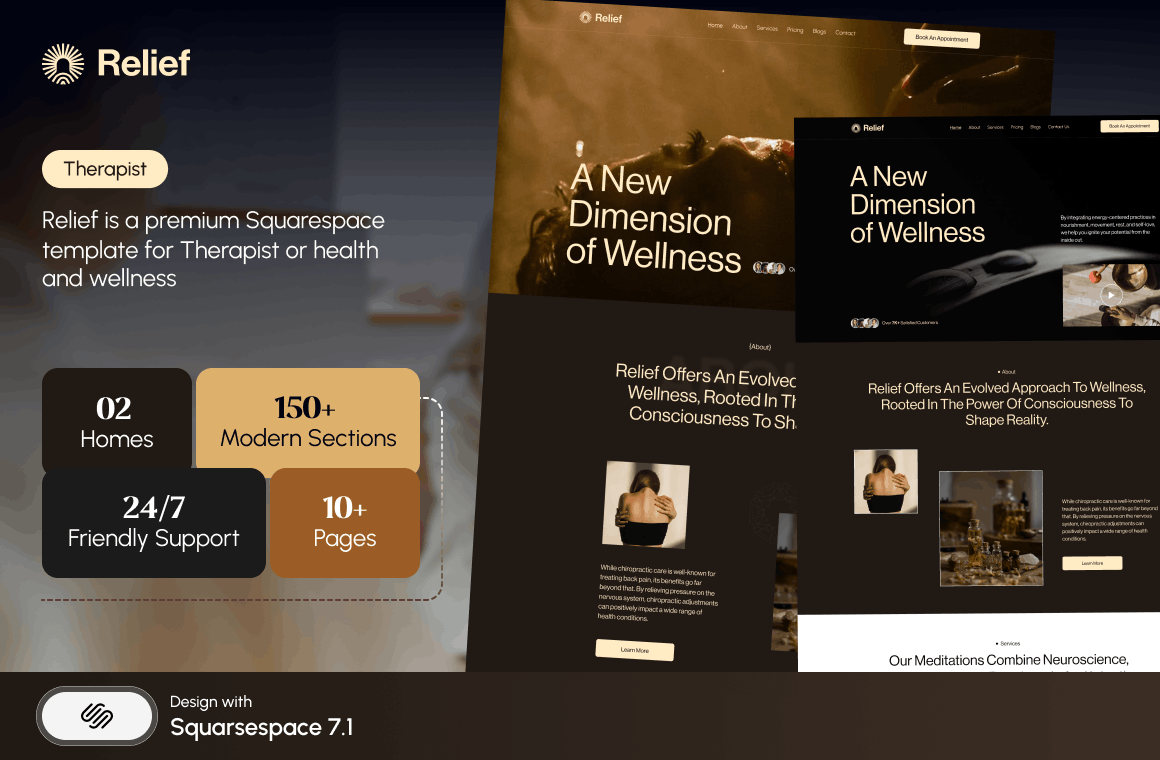
Relief — 21/25. Eleven pages and the only template tagged for therapists. Its About page ships a practitioner grid — the demo shows six named practitioners under a "Supportive Therapists" heading — which is a usable roster for a practice of four or five. Above that, it wants WeDecorefy's Team page. Relief also ships the Pricing and FAQ pages a practice needs, so a common build is Relief plus a roster section lifted from its own About page.
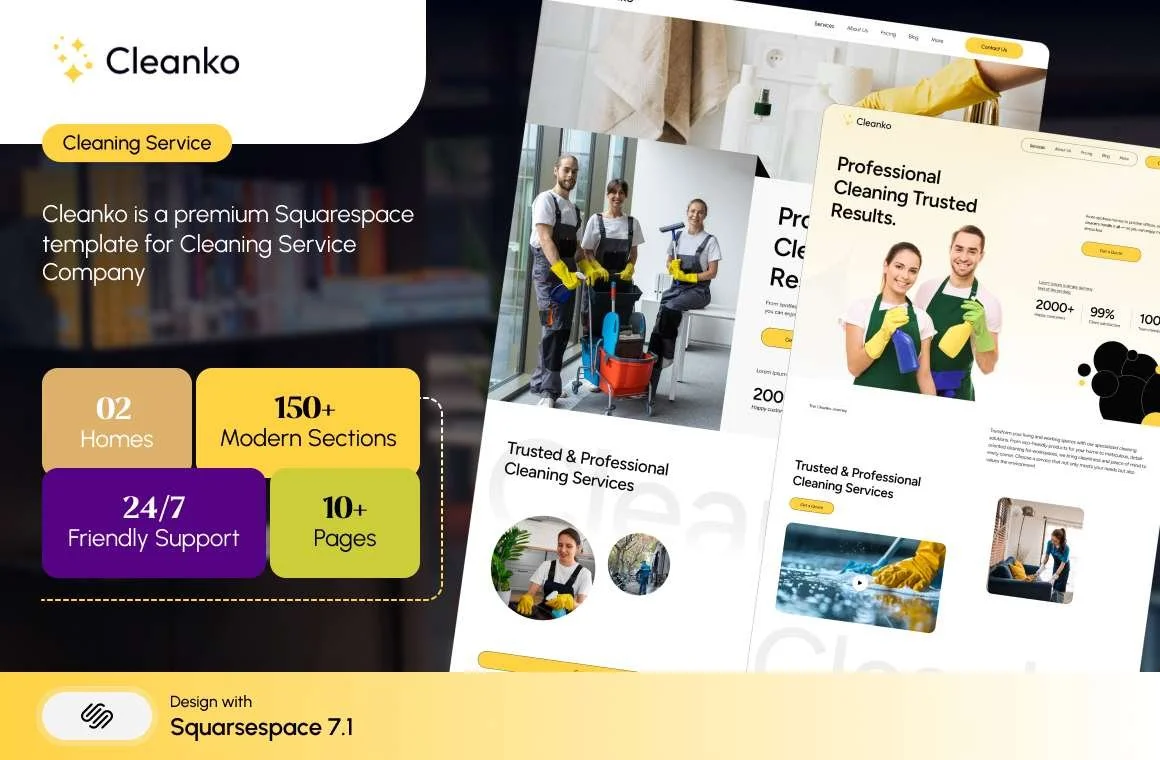
Cleanko — 20/25. Twelve pages with a Service Details page you duplicate per service line, plus Pricing and FAQs. The pick if your practice is organised by service rather than by clinician — assessments, couples work, group programmes — and the roster is secondary.
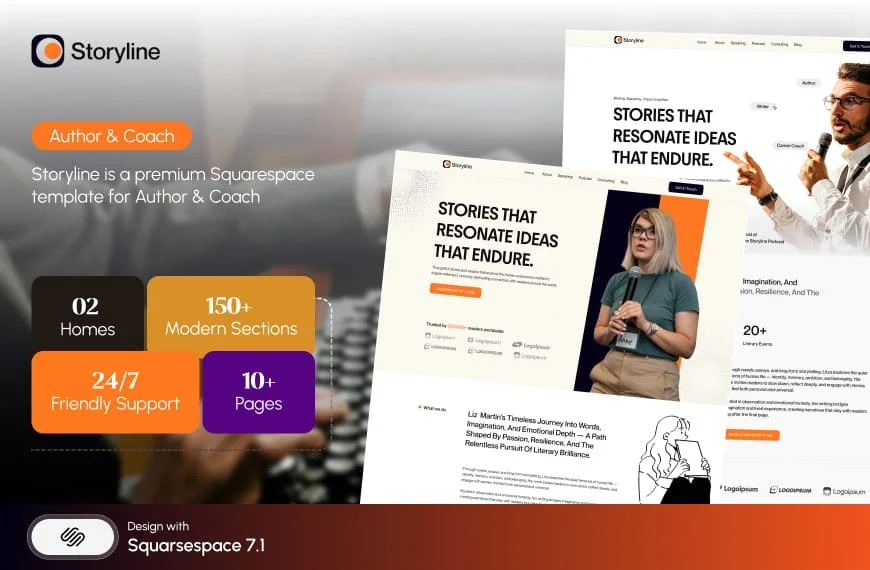
Storyline — 18/25, thirteen pages with a Booking page and a Testimonial page, is structurally strong for a practice that converts on a consultation call, but has no publicly viewable demo; its live-demo link returns HTTP 401 and it is not linked here.

All Squareko templates are $249 and arrive as a Squarespace contributor invitation rather than as files; installation onto an existing live site is a manual add-on taking around 48 hours. The wider therapy template market runs roughly $225–$399. All sales are final, and every demo image must be replaced before launch — which for a group practice means booking one photographer for one day and getting every clinician in the same visual register.
Building it
Order of work: settle where clinical information goes and which platform will sign a BAA with you; decide how clinician profiles are held — layout pages under ten clinicians, a blog collection above that; build the roster with availability status per clinician; add the "not sure who to see" route; then the recruitment page. Design last, because by then you know how many pages you are building and what each one has to hold.
If you are consolidating several individual sites into one practice site, or migrating a practice site that is currently taking referrals, the premium Squarespace templates in our range are delivered as a contributor invitation and can be installed onto an existing live site without taking it down. Plenty of practices run this themselves; the structural decisions above are what determine whether the site works, not which template it started from.
FAQ
-
Under about ten clinicians, use individual layout pages and maintain the roster index by hand — full Fluid Engine control and clean URLs. Above that, use a blog collection with categories for modality, location and age group, because summary blocks can filter blog collections but cannot pull from portfolio pages.
-
WeDecorefy, which is the only template in the Squareko range with one. It also ships a Project Details page that repurposes as a per-clinician profile. It scores 20 out of 25 on the cluster rubric; Relief scores 21 and offers a practitioner grid on its About page that works for four or five clinicians.
-
One on Starter/Emerging, up to six on Standard/Growing, up to 36 on Premium/Powerhouse, and unlimited on Enterprise. One calendar per clinician is the usual mapping. HIPAA-enabling an account also requires Powerhouse or Premium, so larger practices often need that tier for two separate reasons.
-
Most do not, unless helped. Segment the roster by who the client is rather than by modality, publish an availability status per clinician, write profiles that are genuinely distinguishable, and offer a short non-clinical "not sure who to see" enquiry that routes to a coordinator.
-
It is normal and not a problem. Have the practice site rank for the service and location while each clinician's profile page ranks for their name, and ask clinicians to link directory listings and professional profiles to their practice profile page rather than to the homepage.
-
Decide in advance. Deleting it breaks every inbound link that clinician built. Most practices redirect the page to the roster, and in Squarespace that redirect has to be added manually in Settings → Advanced → URL Mappings, because changing or removing a slug creates no automatic 301.

Author Bio
I'm Walid Hasan, a Certified Squarespace Expert and Squarespace Circle Platinum Partner with over 12 years of hands-on experience designing and optimizing high-performing websites. Over the years, I've had the privilege of building more than 2,000 Squarespace websites for clients around the world, always focusing on clean design, strong user experience, and conversion-driven results.